GumEtsy AI Review 2026: Features, Benefits, Pricing, and Is It Worth It

Creating digital products can be a great way to build an online business, but the process often takes considerable time. You need to research a niche, write useful content, design a cover, prepare product files, create sales descriptions, and publish everything on the right platforms. For beginners, handling all these tasks can feel overwhelming.

GumEtsy AI aims to simplify this process by using artificial intelligence to create digital products and help users list them on Etsy and Gumroad. Instead of starting with a blank page, the platform is designed to turn a keyword into a product package containing content, a cover, and sales copy.

But is GumEtsy AI a practical tool for aspiring digital product sellers? What features does it offer, how much does it cost, and what should you consider before purchasing it?

In this GumEtsy AI review, we will explore its advertised features, potential benefits, limitations, pricing, and suitability for different types of users.

What Is GumEtsy AI?

GumEtsy AI is an AI-powered digital product creation platform designed to help users create and publish digital products with less manual work. According to its official sales page, users can enter a keyword and generate a product that includes written content, a cover design, and promotional copy.

The platform focuses on two marketplaces: Etsy and Gumroad. These platforms allow creators to sell digital goods such as ebooks, planners, printable worksheets, templates, guides, and other downloadable resources.

GumEtsy AI is aimed at people who want to start selling digital products but lack writing, graphic design, or technical experience. It may also appeal to existing sellers who want to speed up their product creation process.

The important distinction is that creating a product is only one part of running an online business. Sellers still need to choose appropriate topics, check product quality, understand marketplace rules, and develop a strategy for attracting customers.

How Does GumEtsy AI Work?

The platform promotes a relatively simple workflow intended to reduce the time required to launch a digital product.

Choose a Product Keyword

Start by selecting a topic or keyword related to the audience you want to serve. For example, you might choose meal planning, budgeting, productivity, or wedding planning.

A specific topic generally makes it easier to create a product for a clearly defined audience than a broad subject.

Generate the Digital Product

Enter your chosen keyword into the platform. GumEtsy AI advertises the ability to generate product content, cover designs, and sales copy from that input.

The sales page claims that this process can take approximately 60 seconds. Actual results may vary depending on the product type, output quality, and any additional editing required.

Review and Customize the Content

Before publishing, review the generated material carefully. Check spelling, factual accuracy, formatting, originality, and whether the product provides genuine value.

AI-generated content should be treated as a starting point rather than automatically assuming it is ready for customers.

Prepare Your Marketplace Listing

GumEtsy AI promotes publishing products to Etsy and Gumroad through its dashboard. Verify the current integrations, account connection requirements, and publishing options before purchasing.

You should also review each marketplace’s current policies to ensure your products comply with its rules.

Promote and Improve Your Products

After publishing, monitor views, clicks, conversions, customer feedback, and sales. Improve your titles, product images, descriptions, and pricing based on actual results.

Generating more products does not automatically mean generating more revenue. Product quality and customer demand remain important.

Key Features of GumEtsy AI

AI Digital Product Creation

One of the main advertised features is the ability to generate digital products from a keyword. This could reduce the time spent drafting ebooks, guides, planners, and other downloadable resources.

For new sellers, this may be useful when developing an initial product idea. However, the final output should be reviewed and improved to make it distinctive and genuinely useful.

Product Cover Design

Presentation matters when customers browse digital products online. GumEtsy AI advertises AI-generated covers as part of its product creation process.

A well-designed cover can help communicate what a product offers, but it should accurately represent the contents. Check typography, image quality, readability, and commercial-use rights before publishing.

Sales Copy Generation

Writing an effective product description can be challenging for beginners. The platform advertises sales copy generation to help users explain product benefits and prepare marketplace listings.

You should still check whether the copy clearly describes the product, addresses customer needs, and avoids exaggerated or unsupported claims.

Etsy and Gumroad Publishing

The central selling point is the combination of two marketplace workflows in one platform. Rather than preparing every listing entirely from scratch, users are promised a more streamlined way to publish products.

This could save time for sellers who intend to use both platforms. However, confirm exactly which publishing steps are automated and which require manual approval or editing.

Multiple Digital Product Types

The sales page lists product categories including:

  • Ebooks and educational guides
  • Planners and printable worksheets
  • Templates and prompt packs
  • Business and marketing resources
  • Productivity and personal development materials
  • Journals and other downloadable resources

The suitability of each format will depend on the platform’s actual output capabilities and the amount of editing required.

Beginner-Friendly Workflow

GumEtsy AI is marketed toward people without advanced writing, design, or technical skills. A guided workflow may make the process less intimidating for first-time digital product creators.

Even so, beginners should expect to learn basic market research, listing optimization, customer service, and digital product quality control.

Potential Time Savings

Combining content creation, cover design, sales copy, and marketplace publishing could reduce repetitive work. The greatest benefit may be the ability to prepare an initial product draft quickly and spend more time refining it.

The real time savings will depend on the quality of the generated output and how much manual correction is needed.

Benefits of Using GumEtsy AI

1. Lower barrier to entry: Beginners can explore digital product creation without first mastering multiple specialized tools.

2. Faster product development: AI-generated drafts may reduce the time needed to move from an idea to a finished product.

3. Less repetitive work: Combining several creation tasks in one workflow could make product preparation more convenient.

4. Access to multiple product formats: Users can explore different digital product ideas instead of limiting themselves to a single format.

5. Two marketplace options: Etsy and Gumroad provide different ways to present and sell digital products, subject to their respective requirements.

6. Support for product experimentation: Sellers may find it easier to test different topics and improve their offerings based on customer response.

7. Useful for solo creators: People working independently may appreciate having several content-production tasks organized in one place.

These benefits are potential advantages, not guarantees. Their value depends on the product quality, the seller’s workflow, and the level of demand in the chosen niche.

Who Should Consider GumEtsy AI?

GumEtsy AI may be worth exploring if you are:

  • A beginner interested in selling digital downloads.
  • A blogger looking to develop complementary digital products.
  • A creator who wants to produce planners, guides, or templates.
  • An existing seller seeking to speed up product preparation.
  • An entrepreneur interested in testing different digital product niches.
  • A solo business owner who wants to reduce repetitive content creation tasks.

It may be less suitable for people who expect guaranteed sales, completely hands-off income, or professional-quality products without reviewing the output.

GumEtsy AI Pricing

The official preview page advertises an introductory offer of $19 as a one-time payment, while also displaying a comparison with a stated $197 monthly value for the combined tools. The page does not make every possible billing condition clear in the information reviewed here.

Before buying, confirm the current checkout price, whether the offer is genuinely one-time, what is included in the base package, and whether optional upgrades or recurring charges apply.

Also check any refund policy, usage limits, commercial licensing terms, and marketplace integration requirements. Do not rely solely on promotional reference prices when deciding whether a product is good value.

Is GumEtsy AI Easy to Use?

GumEtsy AI is marketed as a beginner-friendly tool with a keyword-based workflow. The idea is straightforward: choose a topic, generate product materials, review the results, and prepare the listing.

However, ease of use and product quality are different things. A simple interface cannot replace careful research or the judgment needed to create something customers will find useful.

New users should begin with one focused product, inspect every generated section, and learn how to improve the result before attempting to publish a large catalog.

Can You Make Money With GumEtsy AI?

GumEtsy AI is designed to help users create and list digital products, but it cannot guarantee that those products will sell.

Revenue depends on several factors, including:

  • The demand for your chosen product.
  • The quality and usefulness of your content.
  • Competition in your niche.
  • Your product pricing and listing presentation.
  • Marketplace fees and other business expenses.
  • Your ability to attract relevant visitors and convert them into buyers.

For example, a thoughtfully designed budgeting planner for a specific audience may have a clearer purpose than a generic planner competing with thousands of similar products.

A sensible approach is to research demand, create a small number of useful products, measure their performance, and improve them based on real feedback. Treat digital product sales as a business that requires testing and ongoing work, not as guaranteed passive income.

Pros and Cons of GumEtsy AI

Pros

  • Combines several digital product creation tasks in one workflow.
  • Advertises AI-generated content, covers, and sales descriptions.
  • Supports a workflow focused on Etsy and Gumroad.
  • Offers multiple digital product formats and niche ideas.
  • May help beginners reduce the time spent preparing initial drafts.
  • Could be useful for creators who want to test new product concepts.

Cons

  • AI-generated content may require substantial editing.
  • Product creation does not guarantee traffic or sales.
  • Marketplace competition can make it difficult to stand out.
  • The actual level of publishing automation should be verified.
  • Current pricing, upgrade costs, and licensing terms need confirmation.
  • Sellers still need to handle quality control, customer questions, and business development.

Is GumEtsy AI Worth It?

GumEtsy AI presents an interesting concept for anyone who wants to simplify digital product creation. Its main appeal is the combination of AI-generated content, cover design, sales copy, and a workflow intended to publish products on Etsy and Gumroad.

For beginners, this could provide a convenient starting point without requiring separate tools for every stage of product preparation. Experienced creators may also appreciate the opportunity to speed up repetitive tasks.

However, the software should be evaluated on the quality of its actual output, the reliability of its marketplace integrations, and the terms of its purchase offer. Before investing, test the available preview and determine whether the generated products meet your standards.

Most importantly, success depends on more than software. Researching customer needs, creating useful products, improving listings, and attracting the right audience are essential parts of a sustainable digital product business.

My verdict: GumEtsy AI may be worth considering for creators who want an AI-assisted approach to developing digital products. It is best viewed as a productivity tool rather than a complete business solution or a guarantee of income.

Exclusive Bonuses

VVIP Bonus #1 GumEtsy AI Selling Playbook (Value $797)


A seven-day product validation strategy and 15 AI prompts to identify buyer demand on Gumroad & Etsy, test offers, and avoid wasting time creating products nobody wants.

VVIP Bonus #2 GumEtsy AI SmartCrawl Pro WordPress SEO Plugin WHITELABEL (Value $497)

A powerful WordPress SEO plugin featuring sitemap generation, content analysis, automatic internal linking, and site reports to help optimize your website for search visibility.

VVIP Bonus #3 GumEtsy AI Digital Product Cover & Bundle Studio WHITELABEL (Value $397)

Professional design app to create attractive ebook covers, planner designs, worksheet graphics, and digital bundle visuals that make your products look more appealing.


VVIP Bonus #4 GumEtsy AI Digital Product Bundle Builder WHITELABEL (Value $297)


A Practical app to organize ebooks, planners, templates, and worksheets into cohesive digital product bundles with editable descriptions and contents lists.

VVIP Bonus #5 GumEtsy AI AnalyticsWP WordPress Analytics Plugin WHITELABEL (Value $447)


A WordPress analytics plugin to monitor website activity and understand visitor behavior so you can make more informed promotional decisions.

VVIP Bonus #6 GumEtsy AI ChatGPT Viral Cash Stack (Value $697)


AI prompt sequences to discover trending topics, evaluate buyer demand, create digital products, package them professionally, and prepare sales pages and promotional materials.

VVIP Bonus #7 GumEtsy AI Digital Product Listing Optimizer WHITELABEL (Value $497)

A listing optimization app to create compelling product titles, persuasive descriptions, relevant keyword suggestions, and benefit-driven listings for Etsy and Gumroad.

VVIP Bonus #8 GumEtsy AI Sell Before You Create (Value $747)


A page product validation guide and 15 AI prompts to research profitable problems, test offers with real prospects, and validate demand before building your digital products.

VVIP Bonus #9 GumEtsy AI Digital Download Packaging & Delivery Checker WHITELABEL (Value $397)


Organize digital downloads, create customer instructions, structure delivery folders, and check your files and listings before publishing.

VVIP Bonus #10 GumEtsy AI Digital Product License & Usage Guide Builder WHITELABEL (Value $297)


Create editable digital product usage guides covering permitted uses, restrictions, redistribution rules, and customer instructions.

Frequently Asked Questions About GumEtsy AI

What is GumEtsy AI?

GumEtsy AI is an AI-powered platform designed to help users create digital products, including ebooks, planners, templates, and guides, and prepare them for sale on Etsy and Gumroad.

Do I need writing or design experience?

The platform is marketed toward beginners who do not have advanced writing or design skills. Nevertheless, reviewing and customizing AI-generated materials is important for quality.

What types of products can I create?

The official sales page lists ebooks, guides, planners, templates, printables, prompt packs, and other digital product formats. Available options should be verified in the actual platform.

Does GumEtsy AI guarantee sales?

No. Creating and publishing a product does not guarantee customers or revenue. Results depend on product quality, demand, competition, pricing, and marketing.

How much does GumEtsy AI cost?

The preview page advertises a $19 introductory payment. Check the current checkout page for the final price, billing terms, optional upgrades, and any recurring fees.

Can I sell products on Etsy and Gumroad?

The platform advertises publishing support for both marketplaces. You should verify the current integration process and ensure that your products comply with each marketplace’s policies.

Is GumEtsy AI suitable for beginners?

It may be suitable for beginners who want help preparing digital products. New users should still learn basic market research, listing optimization, and product quality control.

Final Thoughts

GumEtsy AI aims to make digital product creation more accessible by combining several AI-assisted tasks into one workflow. Its advertised features may appeal to new creators, bloggers, and online entrepreneurs who want to explore selling downloadable products.

Before purchasing, review the live demo, confirm the full pricing and licensing terms, and assess the quality of the generated content. Start small, focus on solving a genuine customer problem, and improve your products based on actual results.

With realistic expectations and consistent effort, an AI creation tool can support your workflow. The long-term value, however, comes from building products that customers genuinely want and trust.
Postonomous Review 2026: Features, Benefits, Pricing, Pros and Cons

Social media marketing is an important part of growing an online business, but creating content consistently can take considerable time and effort. Businesses need engaging posts, short-form videos, and long-form content that appeal to their target audiences. Even after publishing, there is no guarantee that a post will receive the engagement they expect.

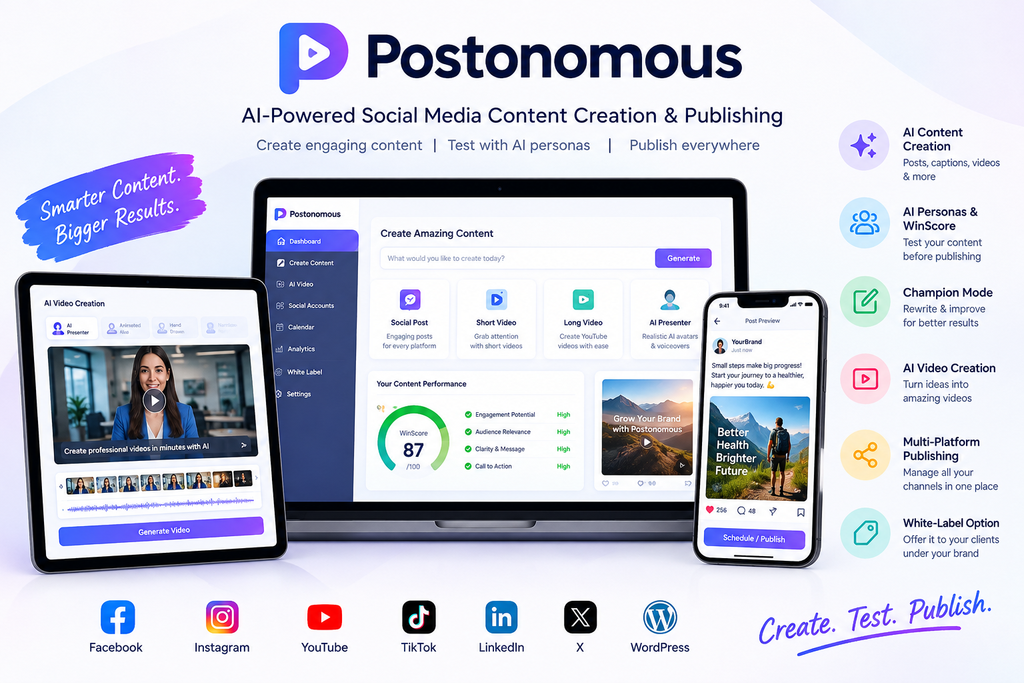
This is where Postonomous aims to make a difference. It is an AI-powered content creation and social media marketing platform designed to help users create content, evaluate its potential audience response, and publish across multiple social media channels from one place. Its approach combines AI content generation with simulated audience feedback before publication.

In this Postonomous review, we will examine its features, how it works, potential benefits, pricing information, advantages, limitations, and who may find it useful.

What Is Postonomous?

Postonomous is the AI social media app that makes the content, predicts what can go viral, and posts it.

It’s built around new research showing AI personas can predict how real people react to a social media post about 70% of the time (Bojić et al., Scientific Reports, September 2026).

Postonomous learns your audience and your competitors’ audiences, shows every post to AI personas before it goes out, and scores it from 0 to 100. If the score is weak, Champion Mode rewrites the post until it beats the benchmark.

You publish the one with a real shot at going viral, instead of guessing. It’s the first launch on JVZoo that does this.

And it does the whole job, not just the prediction:

  • Makes the content. Posts, images and blog articles in your brand’s voice, learned from your website in about a minute.
  • Makes the video. One sentence in, a finished video out: reels, shorts, ads, explainers, documentaries and full YouTube videos. Plus a talking presenter from one photo and your own cloned voice.
  • Posts it everywhere. Publish or schedule Facebook, Instagram, YouTube, TikTok, LinkedIn, X and WordPress from one calendar. Nothing goes out without your OK.
  • Shows what’s already working. It tracks competitors and trending content, so you can recreate a winning format in one click.
  • Checks AI search. AI Presence checks daily or weekly whether ChatGPT, Gemini, Perplexity and other AI assistants recommend your business.
  • Works with your AI agent. Run it from OpenClaw, Hermes, Claude Code, Codex, ChatGPT or Cursor.

It’s also white-label. Buyers can run it for clients under their own name, with a client portal, reports that carry their logo, and a full agency kit

Postonomous Demo Video

How Does Postonomous Work?

Postonomous follows a workflow intended to reduce the manual work involved in social media marketing.

1. Add Your Website

Users begin by providing their website. The platform can use this information to identify brand elements such as the logo, colours, business details, and communication style.

This helps create content that is more closely aligned with a business’s identity instead of relying entirely on generic prompts.

2. Connect Your Social Media Accounts

The official partner page lists Facebook, Instagram, YouTube, TikTok, LinkedIn, and X among its supported social channels.

Connecting the relevant accounts allows users to manage content creation and publishing within the platform. Actual account permissions and publishing capabilities may vary by channel.

3. Generate Content With AI

Users can request content by describing what they need. For example, an online store owner might request five promotional posts for a new product, while a creator might ask for a short educational video.

Postonomous can generate different types of content, including captions, social posts, short videos, and longer video material.

4. Test Content With AI Personas

One of the platform’s main selling points is its content simulator. AI personas evaluate a draft and generate a WinScore between 0 and 100.

A higher score may indicate that the content has characteristics associated with stronger audience engagement. However, the score should be treated as a prediction rather than a guarantee of views, clicks, leads, or sales.

5. Improve and Publish

If a draft does not achieve the desired score, users can use the platform’s Champion Mode to rewrite and retest it. Once satisfied, they can review the content and proceed with scheduling or publishing.

This workflow aims to help users make more informed content decisions before a post goes live.

Key Features of Postonomous

AI Social Media Content Creation

Creating fresh content for several social networks can be challenging. Postonomous brings AI-assisted content generation into a unified workflow, helping users prepare material for different campaigns and audiences.

This may be especially useful for affiliate marketers who promote multiple products and need a consistent publishing schedule.

WinScore Content Evaluation

WinScore is a central feature of Postonomous. Rather than evaluating content only after it has been published, the platform attempts to estimate audience reactions beforehand.

Users can use these scores as an additional decision-making tool when comparing different captions, hooks, or creative approaches. Real-world performance should still be measured using actual analytics.

Champion Mode

Champion Mode is designed to improve content that does not initially meet the desired benchmark. It rewrites and retests drafts, helping users explore alternative versions without having to revise every line manually.

This can make the content preparation process more structured, particularly when producing several posts in one session.

AI Video Creation

Postonomous also includes AI video creation as part of its broader marketing workflow. The official materials demonstrate formats such as narrated videos, AI presenters, animated or hand-drawn scenes, and short-form video content.

Depending on the format, the platform can help combine scripts, narration, visuals, on-screen text, and music into a finished video. This may reduce the need to use several separate tools for basic content production.

Multi-Platform Publishing

Managing multiple social media accounts individually can consume time. Postonomous aims to bring content creation, approval, scheduling, and publishing together in one application.

This can help users organise their marketing activities and maintain a more consistent presence across supported channels.

White-Label Capabilities

The platform promotes white-label functionality for users who want to provide social media marketing services to clients.

For freelancers and agencies, this could create an opportunity to offer branded content services without developing an entire software platform themselves. The precise white-label options, account limits, and client-management features should be confirmed against the package being purchased.

Content Improvement and Comparison

The platform’s simulator allows users to examine content scores and compare alternative versions. This can support a more systematic approach to testing hooks, messaging, and creative ideas.

It is still important to test these predictions against actual engagement data, because different audiences may respond differently to the same content.

Postonomous Pricing and Upsells

Postonomous is promoted through a launch offer with a one-time payment rather than a mandatory monthly subscription for the advertised bundle. However, the final cost and included features should be checked on the live checkout page before purchasing.

According to the official partner materials, the launch funnel lists these offers:

OfferListed price
Front-end bundle$347
Mega Bundle upgrade$247
Mega Bundle Lite downsell$127

Is the Mega Bundle Worth Considering?

The higher-tier bundle may be worth examining if you plan to use Postonomous for multiple brands, client projects, or more extensive content production. Before selecting an upgrade, compare its additional features with the front-end package.

Consider the following questions:

  • How many businesses and social accounts can you manage?
  • What monthly AI credit allowance is included?
  • Are video creation and advanced features included?
  • Does the package support white-label services and client management?
  • Are there any additional fees or usage restrictions?
  • Which features are available permanently, and which depend on third-party services?

Choose the package that matches your actual workflow instead of purchasing every upgrade simply because it is offered during checkout.

Benefits of Using Postonomous

Saves Time on Content Creation

Producing posts, captions, and videos manually can require hours of work. Postonomous aims to combine several steps into one workflow, potentially helping creators spend more time on strategy and audience engagement.

Helps Improve Content Before Publishing

The WinScore and Champion Mode features offer a structured way to review and revise drafts. Instead of relying entirely on intuition, users can compare versions and use the feedback to improve their messaging.

Supports Multiple Content Formats

The ability to create social posts, short videos, and longer video content makes the platform potentially useful for marketers who want to experiment with different formats.

Simplifies Social Media Management

Managing multiple networks from one application can reduce repetitive work and make content planning easier, particularly for freelancers and businesses with limited marketing resources.

Creates Opportunities for Service Providers

White-label capabilities may be attractive to agencies and freelancers who want to offer content creation and social media management as paid services. Success will still depend on finding clients, delivering quality work, and managing customer expectations.

Provides a More Structured Marketing Workflow

By combining creation, testing, approval, and publishing, Postonomous can help users establish a repeatable content process instead of treating every post as an entirely separate task.

Postonomous Pros and Cons

Pros

  • AI-assisted social media content creation.
  • WinScore evaluates drafts before publication.
  • Champion Mode rewrites and retests content.
  • AI video creation within the same platform.
  • Publishing support for six major social networks.
  • WordPress publishing is listed in the official preview.
  • Potential white-label opportunities for agencies and freelancers.
  • One-time launch pricing is advertised for the bundle.
  • A 14-day money-back guarantee is advertised.

Cons

  • AI predictions cannot guarantee engagement or viral reach.
  • Generated content may still require human editing and fact-checking.
  • Users need a clear content strategy to get meaningful results.
  • The available features depend on the selected package.
  • AI-generated videos may need refinement to meet specific brand standards.
  • The initial purchase and upgrades may represent a significant investment for beginners.

Who Should Consider Postonomous?

Postonomous may be a suitable option for people who regularly create and publish content across multiple social platforms.

Affiliate marketers: You can use it to prepare educational posts, promotional content, and videos for your campaigns. Review every claim and ensure your promotions comply with advertising policies.

Small business owners: It may help you maintain a consistent presence while reducing the amount of manual content production.

Social media freelancers: The platform’s creation and publishing workflow may help you manage recurring content tasks for clients.

Marketing agencies: White-label capabilities and multi-brand workflows may be useful if the selected package supports your client-management requirements.

YouTube and short-form video creators: AI-assisted scripts, narration, scenes, and captions may simplify the initial video production process.

On the other hand, people who publish only occasionally or already have an effective content production system may not need all the available features.

Is Postonomous Easy to Use?

The platform is presented as a workflow that starts with a website, connects social channels, and then accepts content requests through an AI-assisted interface. This approach may be approachable for users who do not have advanced video editing or technical skills.

Nevertheless, ease of use depends on your experience, the quality of your instructions, and the complexity of the content you want to create. New users should begin with a simple post, review the generated output, test the publishing process, and learn the available tools before using the platform for larger campaigns.

The official preview includes a walkthrough that can help prospective buyers understand the interface before committing to a purchase.

Postonomous vs. Traditional Content Creation Tools

CapabilityTraditional workflowPostonomous approach
Content writingOften handled separatelyAI-assisted creation
Audience predictionUsually relies on experience and post-publication dataAI persona simulation and WinScore
Content improvementManual editing or separate AI toolsChampion Mode rewriting and retesting
Video productionMay require separate softwareAI video creation within the workflow
Social publishingMay require individual platforms or schedulersCentralised publishing for supported networks
Human reviewDepends on the workflowContent approval before publishing is part of the advertised process

Postonomous’s main difference is the combination of content creation and simulated audience testing. That does not mean every traditional tool lacks these capabilities, or that Postonomous will always produce better results. The right choice depends on your budget, existing tools, and marketing requirements.

Does Postonomous Guarantee Viral Results?

No. This is an important point to understand before buying.

The official materials describe an Instagram Reel that reached 3.1 million views and cite research on AI personas predicting human reactions. However, the company explicitly

Actual social media performance depends on several factors, including:

  • The relevance of the content to your audience.
  • The quality of the hook, creative, and message.
  • Competition and platform algorithms.
  • Posting consistency and audience relationships.
  • Offer quality and the strength of your call to action.

Use Postonomous to help you create and evaluate content, not as a promise of guaranteed views, leads, or affiliate commissions.

Is Postonomous Legit or a Scam?

Based on the official product and partner pages, Postonomous presents a defined set of software features, product demonstrations, pricing information, and a stated refund policy. These are useful details for evaluating the offer, but they do not independently establish the quality of every feature or guarantee customer satisfaction.

Before purchasing, watch the product walkthrough, try the available simulator demonstration, review the checkout terms, and verify which features are included in your chosen package.

Also, avoid relying solely on promotional testimonials or individual success stories. Your own experience, the usefulness of the software, and the results you achieve will depend on how you use it.

Exclusive Bonuses

Bonus 1: AI Content Creation Masterclass

Learn how to use AI tools to create engaging social media posts, captions, and marketing content more efficiently.

Bonus 2: Social Media Marketing Blueprint

Get a step-by-step framework for planning content, choosing platforms, and building a consistent social media presence.

Bonus 3: Viral Hook Ideas Library

Access a collection of hook-writing formulas designed to capture attention and encourage viewers to continue watching your videos.

Bonus 4: 30-Day Social Media Content Calendar

Plan a full month of content with daily post ideas, promotional topics, educational content, and audience engagement prompts.

Bonus 5: AI Video Marketing Guide

Learn how to turn ideas into short-form videos for platforms such as Instagram Reels, TikTok, and YouTube Shorts.

Bonus 6: Copywriting Templates Pack

Use adaptable templates for headlines, captions, calls to action, promotional posts, and audience-focused messaging.

Bonus 7: Affiliate Marketing Content Guide

Discover how to create helpful product-related content, write transparent promotions, and incorporate affiliate links responsibly.

Bonus 8: Social Media Engagement Checklist

Use a practical checklist to review your captions, visuals, messaging, calls to action, and publishing schedule before posting.

Bonus 9: AI Prompt Library for Marketers

Explore reusable prompts for brainstorming content ideas, generating captions, creating video scripts, and adapting messages for different audiences.

Bonus 10: Content Performance Tracking Spreadsheet

Track published posts, reach, engagement, clicks, and conversions to understand which content strategies are working best.

Frequently Asked Questions

What is Postonomous used for?

Postonomous is designed to help users create social media posts and videos, evaluate drafts using AI personas, improve content, and publish across supported social networks.

How does WinScore work?

WinScore assigns a score from 0 to 100 to a content draft. The score is intended to estimate how well the content may resonate with its target audience. It should not be interpreted as a guaranteed engagement rate.

Can beginners use Postonomous?

The platform is presented as a guided, AI-assisted tool that does not require advanced editing skills for its basic workflow. Beginners should still learn content strategy, audience targeting, and platform policies.

Does Postonomous create videos?

Yes. Its advertised capabilities include short-form videos, AI presenters, narrated content, animated scenes, and longer YouTube videos. Available options may depend on the package.

Which social media platforms does it support?

The official preview lists Facebook, Instagram, YouTube, TikTok, LinkedIn, and X. WordPress publishing is also listed separately.

Is Postonomous a monthly subscription?

The advertised launch bundle uses one-time pricing. Check the current checkout page for the exact purchase terms, any upgrades, and possible additional charges.

Does Postonomous offer a money-back guarantee?

The official sales preview advertises a 14-day money-back guarantee. Read the current refund policy and purchase terms to understand the eligibility requirements.

Can affiliate marketers benefit from Postonomous?

Potentially. Affiliate marketers can use AI-generated content and videos to support promotional campaigns. However, they still need to select appropriate offers, produce trustworthy content, disclose affiliate relationships where required, and track actual conversions.

Final Verdict: Is Postonomous Worth It?

Postonomous offers an interesting approach to AI-powered social media marketing by combining content generation, simulated audience feedback, content improvement, video creation, and publishing in one workflow.

Its most distinctive feature is the WinScore simulator, which aims to help users assess content before publishing rather than relying entirely on post-publication analytics. Champion Mode adds another layer by rewriting and retesting drafts.

For affiliate marketers, content creators, freelancers, and agencies that publish regularly, these capabilities may help streamline content production and campaign planning. The white-label offering may also appeal to service providers who want to expand their services.

However, the software is not a replacement for marketing strategy, human judgment, or performance tracking. AI scores cannot guarantee viral content, and a one-time purchase is worthwhile only if the included tools fit your needs and budget.

GrokAI Studio Review 2026: Features, Benefits, Pricing, and Is It Worth It?

Artificial intelligence is changing how people write content, create images, produce videos, and manage online businesses. However, using multiple AI platforms can become expensive and time-consuming. GrokAI Studio is marketed as an all-in-one AI workspace designed to simplify these tasks through a single dashboard.

In this GrokAI Studio review, we will explore what the platform claims to offer, its key features, potential benefits, pricing, pros and cons, and who may benefit from using it. We will also discuss important considerations before purchasing so you can make an informed decision.

GrokAI Studio Overview

FeatureDetails
Product NameGrokAI Studio
Product TypeAI content creation and productivity platform
Main PurposeWriting, research, and creative content generation
AccessBrowser-based, according to the sales materials
Target AudienceMarketers, freelancers, creators, and entrepreneurs
Advertised Price$17 one-time, as reported on the referenced sales page
Money-Back Guarantee30 days, subject to stated conditions
Technical SkillsDesigned for beginners and experienced users

What Is GrokAI Studio?

GrokAI Studio is promoted as an AI-powered dashboard that brings multiple content creation and research capabilities together in one place. Rather than switching between separate tools for writing, brainstorming, image generation, and marketing, users are offered a centralized workspace for their creative tasks.

The platform is aimed at people who want to produce digital content more efficiently. For example, a blogger could use AI to outline an article, a freelancer could draft marketing copy, and a social media manager could brainstorm captions and video ideas.

Its main selling point is convenience. Instead of managing several different interfaces, users can potentially organize more of their workflow within one platform.

However, the advertised capabilities should not automatically be interpreted as unlimited access to every official Grok model or service. The precise integrations and usage restrictions should be verified before buying.

How Does GrokAI Studio Work?

GrokAI Studio is presented as a straightforward platform that uses text prompts to help users complete different tasks.

The general workflow involves three steps:

  1. Access the dashboard: Open the platform through a compatible web browser and sign in.
  2. Enter your prompt: Describe the content you need, such as a blog outline, advertising headline, video script, or research summary.
  3. Review and refine: Examine the generated output, make corrections, and adapt it to your requirements.

For instance, an affiliate marketer could request product comparison ideas, generate an initial review outline, and develop social media captions from the same campaign concept.

The quality of the result depends on the prompt, the underlying AI capabilities, and the amount of human editing involved.

Key Features and Benefits of GrokAI Studio

AI Content Writing

Writing assistance is useful for people who regularly create articles, emails, advertisements, product descriptions, and social media posts. AI-generated drafts can provide a starting point when you are struggling with ideas or facing tight deadlines.

Users should still fact-check information, improve the writing style, and ensure that published content provides genuine value.

AI Image Creation

The promotional materials describe image-generation capabilities. If these tools are available under the purchased plan, they may help users develop visual concepts for social media, marketing campaigns, blog graphics, and other digital projects.

Before relying on this feature for professional work, check image quality, generation limits, commercial-use terms, and any restrictions on generated content.

Video and Voice Tools

Video scripts, voiceovers, and short-form video concepts can be useful for creators who publish on YouTube, Instagram, and other social platforms.

An integrated workflow could help users move from an idea to a draft script and supporting creative assets. Nevertheless, verify which video and voice functions are actually included, along with their output limits and quality.

Research and Trend Discovery

Research assistance can help users brainstorm topics, summarize information, and explore ideas for upcoming content.

The sales materials also promote access to current information and social trends. Because live-data access can depend on the underlying integration, users should test whether the platform retrieves current information and provides sources that can be independently checked.

AI-generated research should never be treated as automatically accurate.

Beginner-Friendly Interface

A prompt-based interface can make AI more approachable for users without technical experience. You can describe a task in ordinary language and refine the output through follow-up instructions.

This may be especially useful for small business owners, new affiliate marketers, and freelancers who want to experiment with AI-assisted workflows.

Potential Commercial Use

Commercial-use rights can be important for agencies, freelancers, and online entrepreneurs who create assets for clients.

Check the actual license and terms before selling generated content or using it in client projects. A commercial-use claim does not necessarily override copyright, trademark, privacy, or platform-specific restrictions.

Who Can Benefit From GrokAI Studio?

GrokAI Studio may be worth exploring for several types of users.

  • Affiliate marketers: Brainstorm product review topics, advertising angles, email ideas, and promotional content.
  • Bloggers: Develop outlines, introductory drafts, FAQs, and content plans.
  • Social media managers: Generate caption ideas, content calendars, and short-form video scripts.
  • Freelancers: Speed up initial drafts for client projects and marketing materials.
  • Small business owners: Explore ideas for promotional campaigns, customer emails, and product descriptions.
  • Beginners: Learn how to use AI assistance without building a complicated workflow from multiple tools.

The biggest potential benefit is saving time on repetitive creative tasks. Results will vary according to the user’s needs, the platform’s actual capabilities, and the amount of editing required.

GrokAI Studio Pricing and Upsells

The referenced sales materials advertise an introductory price of approximately $17 as a one-time payment. They also mention a 30-day money-back guarantee and optional add-on offers.

Pricing and package details may change during a product launch, so the advertised amount should not be considered a permanent price.

Before purchasing, check:

  • Whether the $17 payment includes all advertised features.
  • Whether lifetime access has any usage limits or service conditions.
  • Whether image, video, voice, or premium-model usage requires additional payments.
  • Whether optional upgrades are necessary for your intended workflow.
  • What conditions apply to the money-back guarantee.

A low initial price can be attractive, but the real value depends on what you receive and whether you will use it regularly.

GrokAI Studio Pros and Cons

Pros

  • Offers a centralized approach to AI-assisted creative work.
  • May help reduce time spent drafting routine content.
  • Could simplify workflows for bloggers and digital marketers.
  • A prompt-based approach may suit beginners.
  • The advertised entry price is relatively low.
  • May be useful for brainstorming and developing first drafts.

Cons

  • The full feature set and integrations require verification.
  • AI-generated content can contain factual errors.
  • Output may require substantial editing for professional use.
  • Usage restrictions and additional costs may affect overall value.
  • Long-term availability and the practical meaning of lifetime access should be checked.
  • It does not guarantee traffic, sales, or business income.

Is GrokAI Studio Legit or a Scam?

A fair assessment requires more than promotional claims. The product’s advertised features and low introductory price may sound appealing, but those details alone do not establish its reliability or prove that every advertised capability works as expected.

Before purchasing, review the official sales page, confirm the vendor’s identity, examine the checkout details, read the refund policy, and look for independent user feedback. Be cautious about income testimonials or claims that suggest effortless or guaranteed profits.

Also, do not assume that a third-party product branded around Grok is an official xAI product unless an official relationship is clearly established.

The sensible approach is to evaluate GrokAI Studio based on its actual functionality, transparency, support, and suitability for your needs.

Is GrokAI Studio Worth It?

GrokAI Studio may be worth considering if you regularly produce digital content and want a convenient way to explore AI-assisted writing, research, and creative workflows.

For affiliate marketers and content creators, its potential value lies in helping with brainstorming, outlines, promotional drafts, and other repetitive tasks. However, it should be treated as an assistant rather than a replacement for original thinking, accurate research, or marketing experience.

If you are considering the advertised $17 offer, verify the complete package and refund conditions first. Compare its capabilities with free or established alternatives before deciding.

Exclusive Bonuses

BONUS #1: GrokAIStudio Profit Blueprint ($497 Value)

Step-by-step video training showing you exactly how to turn GrokAIStudio into a $10,000+/month income stream. Includes 47 profitable service ideas, pricing templates, and client acquisition strategies.

BONUS #2: GrokAIStudio Viral Content Vault (Value $997)

A massive vault of the 500 highest-performing content templates we’ve ever found on X. Plug them into GrokAIStudio, customize them in 60 seconds, and watch your engagement explode.

BONUS #3: The Intelligent Prompt Library (Value $797)

300+ pre-built “unlock prompts” that pull the deepest, most valuable answers out of GrokAIStudio. Just paste, customize, and watch the gold flow.

BONUS #4: 30-Day Profit Challenge ($97 Value)

Follow our proven challenge and if you don’t make at least $1,000 with GrokAIStudio in 30 days, we’ll refund your money AND let you keep everything.

Bonus #5: GrokAIStudio Affiliate Empire Blueprint (Value $697)

Step-by-step guide showing you how to use GrokAIStudio to dominate affiliate marketing — from research to copy to ads to scaling. The exact playbook we’ve used to do $19,000+ months on autopilot.

Frequently Asked Questions

What is GrokAI Studio used for?

It is marketed as an AI workspace for content creation, research, and creative tasks. The exact tools available depend on the product’s current offering.

How much does GrokAI Studio cost?

The referenced promotional materials list an introductory one-time payment of approximately $17. Confirm the current price and any optional upgrades before purchasing.

Is GrokAI Studio suitable for beginners?

It is designed around prompt-based interaction, which may make it approachable for beginners. Users should still learn to fact-check and edit AI-generated results.

Can affiliate marketers use GrokAI Studio?

Potential uses include brainstorming product review outlines, writing draft emails, creating social media captions, and planning campaigns. Users must independently verify product information and comply with advertising and affiliate disclosure requirements.

Does GrokAI Studio guarantee income?

No AI tool can guarantee income, sales, or business success. Results depend on your strategy, execution, audience, and market conditions.

Does GrokAI Studio offer a money-back guarantee?

The referenced materials advertise a 30-day guarantee, but conditions may apply. Read the complete refund policy before making a payment.

Final Verdict

GrokAI Studio is marketed as a convenient AI platform for people who want to simplify their content creation and productivity workflows. Its proposed combination of writing, research, and creative tools may appeal to bloggers, freelancers, affiliate marketers, and small business owners.

However, the most important factor is not how many features a sales page promises. It is whether the included tools work reliably, provide sufficient usage, and justify the price.

Our recommendation: Investigate the current offer, confirm the features and terms, and evaluate the platform against your actual needs before purchasing. Used thoughtfully, AI can help streamline creative work, but quality control, original ideas, and informed decisions remain essential.

FaithForge AI Review: Features, Pricing, Benefits, and Is It Worth It?

Creating Christian content can be meaningful, but producing devotionals, Bible study materials, prayer guides, ebooks, and social media posts consistently takes time. For churches, Christian entrepreneurs, authors, and faith-based content creators, managing all these tasks can become challenging.

FaithForge AI is promoted as an AI-powered platform designed to simplify Christian content creation and help users develop digital products for an online audience. It combines content-generation tools with website creation, digital product selling, and potential monetization opportunities.

But what does FaithForge AI actually offer, and is it worth considering for your needs? In this review, we will explore its features, pricing, advantages, limitations, and potential uses.

FaithForge AI Review: Quick Overview

FeatureDetails
Product NameFaithForge AI
Product TypeAI-powered Christian content creation platform
Main PurposeCreate and manage faith-based digital content
Content TypesDevotionals, prayers, Bible studies, ebooks, and social media content
Website and StoreIncluded features, subject to package limitations
Advertised Starting Price$17 one-time payment
Monthly Creation Limit20 creations in the advertised starter package
Money-Back Guarantee30 days, according to the offer
Best ForChristian creators, ministries, authors, and digital entrepreneurs

What Is FaithForge AI?

FaithForge AI is marketed as an all-in-one platform for creating Christian digital content with the help of artificial intelligence. Instead of managing separate tools for writing devotionals, preparing Bible study materials, designing graphics, and building a website, users can access multiple content-related features from one dashboard.

The platform is designed to help turn ideas into resources such as Christian ebooks, prayer journals, sermon outlines, inspirational quotes, Bible verse posts, and short-form video content.

It also advertises website-building and digital storefront features, giving creators a way to present their work online and explore selling downloadable products.

FaithForge AI may be particularly useful for people who want to enter the faith-based content market but lack advanced writing, graphic design, or website development skills.

However, AI-generated material should be treated as a starting point rather than automatically considered a finished, publication-ready product.

Key Features and Benefits of FaithForge AI

1. AI Christian Content Creator

FaithForge AI offers tools for generating different types of Christian content. Depending on the available features, users can create devotional messages, prayers, Bible study lessons, Christian book content, and inspirational quotes.

This can reduce the time spent drafting material from scratch and help creators develop ideas more efficiently.

2. Devotional and Prayer Generators

Preparing regular devotional messages or themed prayer collections can require considerable effort. The platform is advertised as helping users generate content for daily encouragement, family matters, personal growth, and other faith-related subjects.

Users should review the language carefully to ensure that the final content is appropriate for their audience and intended purpose.

3. Bible Study and Sermon Creation

Church leaders, ministry workers, and Christian educators may benefit from tools that help organize Bible study lessons, discussion questions, and sermon outlines.

These resources can provide a framework for further research and preparation. Pastors and teachers should independently verify interpretations, biblical references, and theological claims before using AI-generated material in teaching or sermons.

4. Christian Ebooks and Digital Products

The platform is also promoted for developing longer Christian resources, including ebooks, devotional books, prayer journals, and downloadable study guides.

For creators interested in digital publishing, this may offer a convenient starting point. The final product will still need thoughtful editing, original contributions, proofreading, and appropriate formatting before publication.

5. Scripture Graphics and Short Videos

FaithForge AI advertises tools for creating Christian-themed graphics and short-form video content. These materials may be adapted for platforms such as Facebook, Instagram, YouTube Shorts, and other suitable channels.

Visual content can help creators communicate messages in different formats, although the quality of the output should be checked before publishing.

6. Scripture and Denomination Settings

The reference offer describes a Scripture feature that uses passages from the New Living Translation (NLT), along with settings intended to help tailor content to different Christian traditions.

These features may be useful, but they do not replace careful biblical research. Users should verify quotations, interpretations, translation permissions, and denominational accuracy before distributing content.

7. Website Builder and Digital Store

FaithForge AI advertises website-building and digital storefront functionality. These tools can help users establish an online presence for their ministry, blog, or digital products.

The listed store setup supports connecting payment accounts through Stripe or PayPal. Availability and limitations may depend on the selected package.

8. Ready-Made Christian Resources

The platform also promotes a library of prepared Christian resources, including devotionals, prayers, graphics, Bible studies, and ebooks.

These materials may provide inspiration or starting points for new projects. Before selling or republishing any ready-made resource, check the applicable license and confirm that commercial use is permitted.

How Does FaithForge AI Work?

The advertised workflow is relatively straightforward:

Step 1: Choose a content type. Select an available tool, such as the devotional, prayer, Bible study, or Christian book creator.

Step 2: Enter your idea. Provide the topic, target audience, preferred format, and any relevant instructions.

Step 3: Generate the content. Let the AI prepare an initial draft based on the information supplied.

Step 4: Review and personalize. Check the accuracy, tone, originality, biblical references, and suitability of the material. Add your own knowledge and perspective.

Step 5: Publish or distribute. Depending on your goals and the tools available in your package, prepare the content for a website, social media account, email newsletter, or digital product store.

This workflow can help organize the creative process, but the quality of the final result still depends on human review and effective publishing practices.

FaithForge AI Pricing and Upsells

According to the linked review page, the advertised introductory price is $17 as a one-time payment for the main package. The offer also describes a 30-day money-back guarantee.

The listed starter package has a limit of 20 creations per month, making it important to check whether that allowance is sufficient for your intended workload.

Additional upgrades are advertised separately. These include unlimited content creation, Christian graphics and reels, enhanced website functionality, store monetization tools, automated publishing, larger ready-made resource libraries, agency licenses, and reseller or white-label options.

Some advertised upgrades are priced as high as $397. They are optional offers, but purchasing multiple upgrades can substantially increase the total investment.

The reference page also lists the promotional code FORGE30OFF for a claimed 30% discount across the offer funnel. Confirm whether the code remains active and which items qualify before completing your purchase.

My recommendation is to start by evaluating the core package. Upgrade only when a specific feature addresses a genuine need in your workflow.

Can You Make Money With FaithForge AI?

FaithForge AI is promoted as a tool for exploring several possible business models within the Christian content market.

Selling digital products: Create original devotionals, prayer journals, Bible study guides, or Christian ebooks and offer them through an online store or suitable marketplace.

Providing services to churches: Prepare newsletters, social media content, study materials, and other resources for churches or ministries. Check the license requirements before accepting paid client work.

Affiliate marketing: Publish useful Christian content and recommend relevant products through appropriate affiliate programs. Earnings depend on qualifying purchases and the applicable commission terms.

Building a faith-based audience: Use articles, newsletters, and social media posts to attract readers and develop relationships with a specific audience.

These are potential business applications, not guaranteed income opportunities. Results depend on product quality, audience demand, marketing, competition, and consistent effort. FaithForge AI does not remove the need to build trust or attract customers.

Pros and Cons of FaithForge AI

Pros

  • Offers multiple Christian content creation tools in one platform.
  • May reduce the time needed to prepare initial drafts.
  • Supports different content formats, including written and visual materials.
  • Advertises website and digital storefront functionality.
  • May help beginners start developing faith-focused digital products.
  • Offers potential applications for creators, ministries, and freelancers.

Cons

  • AI-generated religious content requires careful human review.
  • The starter package has an advertised monthly creation limit.
  • Additional upgrades may increase the overall cost considerably.
  • Results depend on the quality of user instructions and editing.
  • Buying the software does not guarantee sales, traffic, or business income.

Who Should Consider FaithForge AI?

FaithForge AI may be worth exploring if you are a Christian content creator, pastor, ministry leader, aspiring author, faith-based blogger, or entrepreneur interested in digital publishing.

It may also suit freelancers who create content for churches, provided they obtain the appropriate commercial license and deliver work that meets their clients’ standards.

However, it may not be the right choice for people who need advanced professional publishing features, want to publish AI output without reviewing it, or expect to generate passive income immediately.

Is FaithForge AI Worth It?

FaithForge AI presents an interesting option for people who regularly create Christian content and want to bring several tasks together in one platform. Its advertised combination of devotional writing, Bible study creation, visual content tools, website building, and digital selling could help organize a faith-based publishing workflow.

The main considerations are the monthly creation allowance, the quality of the generated material, and the cost of optional upgrades. Before buying, review the current feature list, test any available demonstration, understand the license, and confirm the refund conditions.

Ultimately, FaithForge AI is best approached as a productivity tool rather than a complete business solution. It may help you create resources more efficiently, but meaningful, accurate content and a successful online presence still require your own judgment and effort.

Exclusive Bonuses

Bonus 1 — The Faith Content Idea Vault

Value: $97

A library of 300+ ready-to-use faith content ideas and prompts, devotional series, sermon topics, prayer themes, Bible-study angles, and printable concepts, organized so a buyer never faces a blank page again.

Why it converts: The number-one thing that stalls a new creator is “what do I make first?” This bonus answers that on day one, so the buyer gets a win within minutes of logging in, which is exactly when refunds are decided.

Bonus 2 — Zero-to-Audience: The Faith Following Playbook

Value: $127

A step-by-step guide to growing an engaged faith audience from scratch, the simple, authentic way to attract followers on social media who actually want what the buyer creates, even starting from zero and with no existing platform.

Why it converts: It answers the quiet objection “but nobody knows me.” Pairing FaithForge’s creation power with a way to get content seen makes the whole opportunity feel real and reachable.

Bonus 3 — The Faith Monetization Blueprint

Value: $147

The 7 proven ways believers turn faith content into real income, from printables on Etsy and devotional books on Amazon, to newsletters, memberships, and selling to local churches, with a clear recommendation on which to start with first and why.

Why it converts: This is the highest-value bonus because it makes the “provision” promise concrete. Buyers see an actual path from content to cash, which turns a nice-to-have tool into a genuine opportunity.

Bonus 4 — Done-For-You Faith Canva Template Pack

Value: $97

A pack of 50+ professionally designed, fully editable templates for faith graphics, scripture quote posts, social content, and printables, drop in the words FaithForge creates and publish something beautiful in minutes.

Why it converts: It compresses the gap between “created” and “shared.” Buyers get a polished, professional look instantly, which builds the confidence that keeps them using the product (and staying past the refund window).

Bonus 5 — The 30-Day Ministry Launch Plan

Value: $97

A day-by-day calendar that takes a buyer from zero to a published, income-ready faith presence in 30 days, exactly what to create, share, and offer each day, so momentum never stalls.

Why it converts: A plan removes overwhelm. When buyers can see the first 30 days laid out for them, “I’ll get to it someday” becomes “I’ll start tonight,” which is the difference between a sale that sticks and a refund.

Frequently Asked Questions

Is FaithForge AI beginner-friendly?

The platform is marketed toward users who want to create Christian content without advanced technical skills. Reviewing the available demonstration before purchasing is a sensible way to judge whether its workflow suits you.

Does FaithForge AI guarantee income?

No software can guarantee that your digital products will sell or that you will earn a particular amount. Success depends on audience demand, product quality, pricing, and promotion.

Can I sell content created with FaithForge AI?

The offer describes commercial rights for eligible products. Review the exact license terms, including any restrictions on AI-generated or ready-made resources, before selling or distributing them.

Is FaithForge AI a one-time purchase?

The linked offer advertises a one-time payment for the main package. Optional upgrades may cost extra, so check the final checkout total and the terms of any additional services.

Does AI-generated Christian content need editing?

Yes. Scripture quotations, theological interpretations, originality, and wording should all be reviewed before publication or use in ministry.

Final Verdict

FaithForge AI may be a useful option for Christian creators seeking support with content creation and digital publishing. Its advertised tools cover several practical needs, from devotionals and Bible study materials to graphics, websites, and digital products.

Its value ultimately depends on your workflow, the quality of its results, and whether the included features justify the price. Review the current offer carefully, remember that upgrades are optional, and treat AI as an assistant to your work rather than a replacement for accuracy, thoughtful teaching, or authentic communication.

For someone with a clear plan to create and share valuable faith-based resources, FaithForge AI is worth investigating before making a purchase.

ComicVideos AI Review: Create Engaging Comic Videos With AI

Creating short-form videos can be surprisingly time-consuming. Even a simple comic-style video may require a script, characters, illustrations, voiceovers, captions, music, editing, and resizing for different platforms. ComicVideos AI is designed to bring many of these steps together inside one AI-powered platform.

But is ComicVideos AI actually useful, or is it simply another AI video tool with big marketing promises? In this ComicVideos AI review, we’ll look at what it does, its main features, how it works, who it may be suitable for, and whether it is worth considering.

ComicVideos AI is an AI-powered content creation platform focused on making comic-style videos from simple ideas or prompts. According to its official promotional material, users can enter an idea and have AI assist with the story, characters, artwork, voices, captions, music, and video assembly.

The platform is aimed at creators who want to produce attention-grabbing content for platforms such as YouTube Shorts, TikTok, Instagram Reels, and other social channels.

FeatureDetails
ProductComicVideos AI
Main PurposeComic-style video creation
Creation MethodAI-powered
Content TypesComic videos, stories, kids/family content
Character CreationAI character consistency
VoiceoversAI-generated voices
Captions & MusicIncluded
Comic BooksMulti-page comic creation
Suitable ForCreators, marketers, agencies, businesses

ComicVideos AI is built around a simple concept: turn an idea into a finished comic-style video without requiring advanced design or video-editing skills.

Instead of creating individual images, writing narration separately, recording voiceovers, and assembling everything in another editor, the platform attempts to combine these tasks into one workflow.

The official JV page highlights features such as idea-to-video creation, consistent characters, AI voices, captions, music, comic-book generation, and an animated kid-character mode.

This makes the software particularly interesting for people building faceless content channels or experimenting with story-based short-form videos.

The process is designed to be relatively straightforward.

1. Enter Your Idea

You can start with a simple topic, story concept, or prompt. You don’t necessarily need to write a complete script before starting.

2. Choose a Visual Style

The system can turn your concept into comic-style visual scenes. This allows creators to develop content around different storytelling formats and niches.

3. Build the Characters and Story

AI assists with creating the story and characters. One of the main selling points is maintaining a recognizable character throughout multiple scenes.

4. Add Voice, Music and Captions

The platform can add AI-generated narration, captions, and background music to help turn the visual story into a more complete video.

5. Export and Publish

Once the video is ready, it can be downloaded and used on supported content platforms.

AI Comic Video Creation

The main feature is the ability to transform a basic idea into a comic-style video. This can reduce the amount of manual work involved in producing short-form content.

Consistent Characters

Character continuity is one of the most important challenges when creating AI-generated stories. ComicVideos AI specifically promotes consistent faces, outfits, and visual styles across panels.

That can be useful when creating recurring characters or episodic content.

AI Voiceovers

The platform includes AI-generated voices so creators don’t necessarily need to record their own narration or hire voice actors.

Captions and Music

Captions can make short-form videos easier to follow, while background music can add atmosphere and improve the overall presentation.

Comic Book Generator

ComicVideos AI isn’t limited to videos. Its promotional material also describes a comic-book generator designed to create multi-page comic stories while maintaining the same cast.

Kids and Family Content

The platform also promotes an animated kid-character mode for creators interested in family-friendly storytelling and children’s content.

Multiple Business Uses

The software is positioned for more than entertainment creators. The official page mentions creators, coaches, agencies, local businesses, eCommerce brands, and other businesses as potential users.

The pricing structure includes a front-end offer followed by optional upgrades. Current third-party pricing information reports a front-end price around $37, with additional upgrades such as Pro, Automation, Growth, and Agency packages.

There is also a bundle option that combines several products and upgrades.

Because launch pricing and bonuses can change, buyers should check the current checkout page before purchasing rather than relying on an old promotional price.

One important point is that a one-time purchase does not necessarily mean unlimited AI generation. Available credits and usage allowances can vary according to the selected package.

ComicVideos AI may be worth exploring for:

  • YouTube Shorts creators
  • TikTok creators
  • Instagram Reels creators
  • Faceless-channel owners
  • Storytelling content creators
  • Affiliate marketers
  • Social media managers
  • Agencies creating content for clients
  • Businesses experimenting with visual storytelling
  • People who want to create comic-style content without advanced editing skills

It may be less suitable for someone looking for a traditional professional video editor with complete manual control over every production element.

Pros

  • Simple idea-to-video workflow
  • Focuses specifically on comic-style storytelling
  • AI-assisted character creation
  • Voiceovers, captions and music included
  • Can support recurring characters and story series
  • Comic-book creation feature
  • Useful for short-form content
  • Potentially helpful for faceless content creators

Cons

  • AI-generated results can still require editing
  • Character consistency may not always be perfect
  • Usage can depend on credits
  • Some advanced capabilities may require upgrades
  • AI-generated content still needs human creativity to stand out

Independent testing has also noted that generated characters can occasionally drift between scenes and that the default output may feel more like a slideshow until additional video-generation features are used.

ComicVideos AI is interesting because it focuses on a very specific content format rather than trying to be a generic AI video editor.

The biggest attraction is the possibility of creating recurring comic characters and turning them into short-form stories. That can be valuable for creators who want to build a recognizable content series rather than publish unrelated AI-generated clips.

However, it is important to keep expectations realistic. AI can speed up production, but it does not automatically guarantee viral views, followers, or income. Your topic selection, storytelling, hooks, editing decisions, thumbnails, publishing consistency, and audience research still matter.

ComicVideos AI could be a useful option for creators who want a faster way to experiment with comic-style videos and AI-powered storytelling.

Its combination of character creation, story generation, voiceovers, captions, music, and comic-book functionality makes it more than a basic image generator.

The biggest reason to consider it is convenience. Instead of jumping between multiple tools for every part of production, users can handle much of the workflow from one platform.

That said, buyers should carefully review the current pricing, credits, commercial-use terms, and upgrade options before purchasing. If your goal is to build engaging story-driven short-form content and you are comfortable refining AI output, ComicVideos AI is certainly worth a closer look.

1. VIRAL VIDEO WP THEME

Description:

Want to generate evergreen and repetitive traffic from your Traffic100k videos?? Post your videos to your WordPress blog as well with ViralVideo Theme.

ViralVideo will enable you to create almost any type of site where users can join and become members with absolute ease.

​ViralVideo is beautifully designed and built to be engaging, fast and most importantly boost viral traffic with simple features that will help keep your visitors on your site.

2.VIRAL SECRETS EXPOSED

Description:

Combine these strategies with your usual marketing to maximize your results with it. The SECRET code to going viral, confessions of a viral media spy.

​Uncovers secrets to getting your content to driving 1000s, and even 1,000,000 of hits overnight

​Easiest way to make all your content share worthy, assuring it goes viral. How to put your viral campaign on Autopilot, giving you hands-free delivery of incentives.

3. RAPID INSTAGRAM PROFITS

Description:

Just getting started With Instagram? Learn the Secrets To Rapidly Turn Instagram Into A Profit Pulling Machine.

4.MODERN VLOGGING

Description: 

Doing something that you love and recording it to share with the world and making money at the same time.

Vlogging is becoming increasingly more popular and there has never been a better time to start a vlog.

People really enjoy watching high quality vlogs and some vloggers have subscribers in the millions. But you don’t need millions of subscribers to make money from vlogging

5. 666,317 YOUTUBE VIEWS CASE STUDY!

Description:

How to properly leverage the power of YouTube, the second largest search engine online! See the exact video that got over 666,317 views and the exact strategy and method behind it.

​In this 6-part Over-the-shoulder video course, we take you through the entire process of how to start a fresh Youtube channel and generate real targeted traffic from YouTube!

6.HOW TO BECOME A SUCCESSFUL SOCIAL MEDIA INFLUENCER

Description:

Becoming an influencer or being considered an influencer is not only about having many followers. It is about having your opinion followed and considered by a particular audience. And at the same time, this implies a lot of hard work that involves a lot of learning, perseverance, and dedication.

Brands love social media influencers because they encourage their followers to buy products they promote.

7.$10,060 & 6,424 LEADS CASE STUDY-

Description:

How Gaurab Made $10,060 In Commissions & Generated 6,424 Leads With One Of My Campaign! I used a combination of Facebook Ads, Solo Ads, Social Traffic to achieve it.

​The strategies you’re going to learn below are the exact strategies he use in his business. If you’re looking to build a long-term, reliable and profitable online business, then watch this 3-Part Case Study and mostly importantly – TAKE ACTIONS!

8.PERSONAL BRANDING BLUEPRINT

Description:

The Personal Branding Blueprint is the one-stop shop for everything you will need to know to own a successful personal brand.

This eBook takes you on a journey through the branding process, asking you questions about your dream life in order to make your brand fit it.

What is ComicVideos AI?

ComicVideos AI is an AI-powered platform designed to create comic-style videos from ideas, scripts, and prompts.

Can beginners use ComicVideos AI?

Yes. The platform is designed around a simplified workflow, making it accessible to people who may not have professional video-editing or illustration skills.

Can I create videos for social media?

The platform is promoted for short-form content and allows finished videos to be downloaded and published on different platforms.

Does ComicVideos AI create characters?

Yes. Character creation and maintaining visual consistency are among its highlighted features.

Can ComicVideos AI create comic books?

Yes. The platform promotes a comic-book generator capable of creating multi-page comic content.

Is ComicVideos AI worth buying?

It depends on your content goals. If you specifically want AI-assisted comic storytelling, it may be worth considering. However, review the current offer, credits, upgrades, and commercial terms before making a purchase.

CinematicWeb AI Review: Create Stunning Websites Without Coding

CinematicWeb AI is an AI-powered website creation platform designed to help users build professional and visually engaging websites without needing advanced coding or design skills. It combines AI website creation, content generation, graphics, animations, cinematic effects, responsive layouts, SEO tools, and lead-generation features in one platform. Users can start with a simple idea or business concept and use AI to create a website that can then be customized and published.

The platform is aimed at entrepreneurs, marketers, freelancers, agencies, affiliate marketers, local businesses, and content creators who want to create websites more quickly. Its commercial-use features can also be useful for freelancers and agencies interested in creating websites for clients. Overall, CinematicWeb AI focuses on making modern, interactive website creation simpler by combining several traditionally separate tools into one AI-based platform.

FeatureDetails
ProductCinematicWeb AI
TypeAI Website Builder
PurposeCreate cinematic websites
CodingNo coding required
Key ToolsAI design, copywriting & visuals
SEOBuilt-in SEO tools
Lead GenerationForms, popups & CTAs
Commercial UseAvailable
Starting Price$17 at launch
Guarantee30-day money-back guarantee

CinematicWeb AI is an AI-powered website creation platform designed to help users build modern, visually engaging websites without requiring advanced coding or web-design skills. Instead of starting from a blank page, users can provide an idea or business concept and use AI to generate website layouts, content, graphics, and design elements.

The platform focuses on creating more dynamic websites by incorporating cinematic animations, scrolling effects, interactive sections, parallax effects, and other visual elements. It also includes tools for AI copywriting, graphics creation, SEO optimization, lead capture, and responsive website design.

CinematicWeb AI can be useful for entrepreneurs, affiliate marketers, freelancers, agencies, and businesses that want to create websites quickly. Its commercial-use capabilities may also allow users to build websites for clients and offer website creation as a service.

CinematicWeb AI works by using artificial intelligence to simplify the website-building process. Instead of manually designing every page, users can provide information about their business, niche, or website idea, and the platform uses that input to generate a website structure and content.

After the initial website is created, users can customize the design, text, images, sections, animations, and other elements to match their brand or project. The platform is designed to make it possible to create visually engaging websites without requiring advanced coding knowledge.

CinematicWeb AI also brings additional tools into the workflow, including AI-generated copy, visual creation, responsive design, SEO-related features, and lead-generation elements. Once the website is ready, users can connect a custom domain and publish it online, depending on the features included in their selected plan.

  • AI Website Creation: Build professional websites from a simple idea or prompt without starting from scratch.
  • Cinematic Designs: Add animations, scrolling effects, parallax elements, and interactive sections for a more engaging look.
  • AI Copywriting: Generate website headlines, descriptions, sections, and calls to action with AI.
  • AI Visual Creation: Create visual assets that can be used throughout your website.
  • SEO Tools: Access features designed to help optimize website content and basic SEO elements.
  • Lead Generation: Add forms, popups, and calls to action to help collect visitor information.
  • Responsive Design: Create websites designed to work across desktop, tablet, and mobile devices.
  • Commercial Use: Suitable for freelancers and agencies that want to create websites for clients, depending on the selected license.

Pros

  • AI-powered website creation
  • No traditional coding required
  • Cinematic animations and visual effects
  • AI-generated website copy
  • Built-in visual creation tools
  • SEO-related features
  • Lead-generation tools
  • Custom-domain integration
  • Responsive website creation
  • Commercial license
  • Cloud-based platform
  • One-time-payment positioning for the core offer

Cons

  • Advanced features may require upgrades
  • Highly animated websites need careful optimization for performance

CinematicWeb AI is promoted with a low-cost front-end offer designed to give users access to the core website-building platform. According to the launch information, the front-end price is $17, with additional optional upgrades available for users who want more advanced capabilities.

CinematicWeb AI Pricing

  • Front-End – $17: The main CinematicWeb AI package for creating AI-powered websites.
  • Premium Edition – $47: An optional upgrade aimed at users who want additional features beyond the basic package.
  • Unlimited Edition – $97: Designed for users who need greater usage and website-creation capacity.
  • Done-For-You Edition – $197: Intended for buyers who prefer a more hands-off approach.
  • Automation Edition – $47: Adds additional automation-oriented functionality.
  • Conversion Booster – $47: Focuses on features intended to improve website conversion elements.
  • Speed Optimization – $37: Provides tools or features focused on website performance.
  • Traffic Booster – $47: Designed around additional traffic-generation capabilities.
  • Agency Edition – $97–$197: Intended for agencies and professionals managing websites for multiple clients.
  • Reseller Edition – $197: Designed for users interested in reselling website-building services.
  • WhiteLabel Edition – $497: Intended for users who want to present the platform or services under their own branding.

Are the Upsells Required?

No. The additional offers are optional upgrades, so users do not necessarily need to purchase every OTO to use the main product. The appropriate package depends on how many websites you plan to create and whether you need features such as automation, agency management, reseller functionality, or white-label capabilities.

For someone who only wants to experiment with AI website creation, the front-end package may be sufficient. Users planning to build websites for clients or operate a larger website service may want to examine the higher-tier upgrades more closely.

Is There a Money-Back Guarantee?

The launch information advertises a 30-day money-back guarantee. This gives buyers a period to evaluate the product while remaining subject to the specific terms and conditions shown at checkout.

Important Pricing Note

Online product pricing, OTO availability, bonuses, and package contents can change during a launch. Therefore, the prices above should be treated as the pricing information associated with the referenced launch material rather than a permanent price list. Always check the official checkout page before purchasing to confirm the current price and exactly what is included in each upgrade.

CinematicWeb AI is designed for people who want to create modern, visually engaging websites without spending a lot of time learning coding or professional web-design software. The official launch material specifically positions it for agencies, freelancers, coaches, marketers, businesses, entrepreneurs, and content creators.

  • Entrepreneurs: Create a professional website for a new business, project, or idea.
  • Affiliate Marketers: Build attractive landing pages, niche websites, and promotional sites without starting from scratch.
  • Freelancers: Create websites for clients and offer website-building services.
  • Agencies: Manage multiple client websites and, with the relevant upgrade, additional users.
  • Coaches & Consultants: Build professional websites to present services, expertise, and offers.
  • Small Businesses: Establish an online presence with responsive designs, lead forms, and calls to action.
  • Content Creators: Create visually appealing websites to showcase content, projects, or personal brands.
  • Beginners: People without advanced technical or design skills can use AI-assisted tools to generate websites from an idea or prompt.

Overall, CinematicWeb AI is mainly suited to users who want to create websites quickly while combining AI-generated content with cinematic visual effects and interactive design elements. Its commercial features can also make it relevant to users who plan to create websites for clients rather than only for personal use.

CinematicWeb AI may be worth considering for users who want to create visually engaging websites without relying heavily on coding or traditional web-design tools. The platform combines AI website creation with features such as cinematic animations, interactive effects, AI-generated copy, visual creation, SEO tools, lead capture, and one-click publishing.

One of its main attractions is the ability to use the same platform for different types of projects. Entrepreneurs and marketers can create their own websites, while freelancers and agencies can use the commercial features to build websites for clients. The platform also advertises custom-domain integration, responsive designs, multilingual website creation, and cloud-based access.

However, buyers should consider their actual requirements before purchasing. Some advanced capabilities are presented as optional upgrades, including unlimited functionality, automation, agency tools, traffic-related features, and white-label functionality. Therefore, the advertised front-end price does not necessarily represent the total cost for someone who wants every available feature.

Overall, CinematicWeb AI is particularly relevant to people looking for an AI-assisted website builder with a strong focus on cinematic and interactive design. Users should review the current package details, upgrade prices, license terms, and refund conditions before making a purchase.

CinematicWeb AI brings together AI-powered website creation, content generation, visual design, animations, SEO tools, and lead-generation features in one platform. Its focus on cinematic and interactive websites makes it different from a basic template-based website builder.

For entrepreneurs, affiliate marketers, freelancers, agencies, and small businesses, the platform can provide a convenient way to create professional-looking websites without needing advanced coding skills. The commercial-use options may also be useful for people who want to create websites for clients.

Before purchasing, it is important to check the current pricing, available upgrades, license terms, included features, and refund policy. AI-generated websites and content may also require some editing and optimization to match a specific brand or business goal.

Overall, CinematicWeb AI is a practical option to consider if your goal is to create modern, visually engaging websites with the help of AI, particularly when you want to combine website design, content, visuals, and interactive effects in one workflow.

1.How To Find Target Domain For Your Site

2.Site Speed Secret

3.Wp Secure Website Plugin

4.Wp Site Transfer Guide

5.100Web Business Models

6.Wordpress Web Security

7.Set Up Your First Website

What can I create with CinematicWeb AI?

You can use it to create websites for businesses, marketing campaigns, personal brands, affiliate projects, services, and other online ventures.

Does CinematicWeb AI include AI content creation?

Yes. The platform includes AI-powered copywriting tools that can help generate website text, headlines, descriptions, and calls to action.

Can I create animated websites?

Yes. CinematicWeb AI focuses on cinematic and interactive designs and includes features such as animations, scrolling effects, parallax elements, and interactive sections.

Does CinematicWeb AI offer SEO features?

Yes. The platform includes SEO-related tools designed to help with elements such as meta information, sitemaps, and schema markup.

Can I use CinematicWeb AI for client websites?

The platform offers commercial-use capabilities with applicable licenses, making it relevant to freelancers and agencies creating websites for clients.

Is CinematicWeb AI suitable for beginners?

Yes. Its AI-assisted workflow is designed to reduce the technical knowledge required to get a website started, although some customization and optimization may still be needed.

Does CinematicWeb AI work on mobile devices?

The platform promotes responsive website creation, allowing websites to be designed for different screen sizes, including smartphones, tablets, and desktop computers.

What is the price of CinematicWeb AI?

The launch information lists the front-end offer at $17, with additional optional upgrades available. Pricing and package details may change, so check the current checkout page before purchasing.

Does CinematicWeb AI have a money-back guarantee?

The launch information advertises a 30-day money-back guarantee. Buyers should review the current refund terms at checkout.

ProductsPilot Review: Is This AI Tool Really Worth It?

Creating digital products can be a profitable online business model, but the process usually involves several separate tasks: finding a niche, designing products, preparing files, writing marketplace listings, creating promotional content, and attracting visitors.

ProductsPilot is designed to bring many of these steps together in one AI-powered workflow. Instead of starting with a blank canvas, users can research product opportunities, generate digital products, prepare marketplace listings, and use built-in traffic tools to promote them.

In this ProductsPilot review, we’ll look at what the platform does, how it works, its main features, pricing, benefits, limitations, and whether it may be suitable for someone interested in building a digital-product business.

ProductsPilot is positioned as an AI system for people who want to create and sell downloadable products without having to handle every technical and creative task manually. According to its sales page, the system combines research, product creation, listing preparation, and traffic generation into one workflow.

The platform focuses on products such as wall art, planners, templates, invitations, educational resources, digital planners, PDF guides, and craft files. Its current Premium offer includes 15 finished products per month and access to eight product categories.

Creator: Abhi Drivedi

Product Name: ProductsPilot

Official website: Click Here

Front-End Price: $37

Bonus: Yes, Huge Bonuses

Skill :All Levels

Guarantee: 30-day money back guarantee

Support: Еffесtіvе Rеѕроnѕе

Recommend: Highly recommended!

ProductsPilot is an AI-powered platform designed to help users create and sell digital products online with less manual work. Instead of relying on several separate tools for product research, design, listing creation, mockups, and promotion, ProductsPilot brings these tasks together into a single workflow.

The platform is aimed at people who want to build a digital-product business around items such as planners, templates, wall art, invitations, educational resources, PDF guides, and craft files. Its AI tools are designed to help users find potential product ideas, turn those ideas into finished digital products, and prepare them for marketplaces such as Etsy and Gumroad.

One of the main features of ProductsPilot is its focus on the entire selling process rather than product creation alone. Users can research niches, generate products, create lifestyle mockups, prepare marketplace listings, and access tools intended to support organic promotion.

In simple terms, ProductsPilot is designed to make the journey from a digital-product idea to a ready-to-market listing more streamlined, particularly for beginners who may not have advanced design, research, or marketing skills.

Features & Benefits of ProductsPilot

ProductsPilot combines several tools designed to simplify the digital-product business process. Here are some of its key features and the potential benefits for users:

AI Niche Research

ProductsPilot helps users discover digital-product opportunities by analyzing demand and competition. This can make it easier to identify niches before spending time creating products.

AI Product Creation

The platform can generate complete digital-product sets based on selected ideas and styles. This can reduce the amount of manual design work required.

Multiple Product Categories

Users can explore different categories such as planners, templates, wall art, invitations, educational resources, PDF guides, and craft files, giving them flexibility when building a product catalog.

Print-Ready Files

ProductsPilot is designed to produce downloadable files suitable for digital delivery and printing. This can save users time when preparing products for customers.

Automated Mockups

The platform can create lifestyle-style product mockups that can be used in marketplace listings and promotional content, helping sellers present their products more professionally.

Marketplace Listing Tools

ProductsPilot can assist with preparing product titles, descriptions, tags, categories, and other listing information for platforms such as Etsy and Gumroad.

Organic Traffic Tools

The Traffic Builder provides tools for creating promotional content across several organic channels. This can help sellers promote their products without depending entirely on paid advertising.

Commercial Rights

The platform states that users receive commercial rights for products created through ProductsPilot, allowing them to use the generated products in their digital-product business.

Cloud-Based Platform

Because ProductsPilot operates online, users can access the platform without installing complex design software on their computer.

Overall, these features are intended to reduce the time and technical work involved in researching, creating, listing, and promoting digital products.

Pros

  • AI-assisted product research and creation
  • Helps streamline multiple stages of the digital-product workflow
  • Supports several digital-product categories
  • Includes automated product mockups
  • Provides tools for creating Etsy and Gumroad listings
  • Offers organic traffic and promotional tools
  • Commercial rights are included according to the official sales page
  • Cloud-based and does not require complicated software installation
  • Can be useful for beginners with limited design experience

Cons

  • AI-generated products may still require manual review and editing
  • Results can vary depending on the niche and product idea
  • Automation does not guarantee sales or profits
  • Marketplace competition can make it difficult for new sellers to stand out
  • Users still need to understand their target audience and marketplace policies
  • Some advanced features may require additional upgrades

ProductsPilot is currently being promoted with a one-time launch price of $37 for the Premium package. The official sales page states that this launch offer is intended to provide access without monthly fees, although it also says the pricing model is expected to move to monthly billing after the launch period.

ProductsPilot Premium – $37

The Premium package includes the core ProductsPilot system, including the AI Niche Finder, 15 complete products per month, access to all eight product categories, AI style generation, print-ready files, automated mockups, Etsy and Gumroad listing tools, two shops, the seven-channel Traffic Builder, product history and commercial rights.

The current offer also includes several launch bonuses, including the Red-Carpet Live Profit Workshop, 30 Proven Niche Blueprints, The Listing Vault, Founding Members Community, and The First 30 Days Checklist. The page lists a 14-day money-back guarantee.

ProductsPilot Bundle – $317

For users who want additional business and agency-oriented tools, the sales page also lists a $317 Bundle. It includes everything in Premium plus three upgrades: Profit Engine, Agency Unlimited, and Turbo Growth.

Profit Engine adds features such as a curated offer library, AI offer-to-niche matching, smart link testing, AI money content, a commission command center, and Media Kit Pro. Agency Unlimited is designed around client accounts, white-label capabilities and team access, while Turbo Growth adds features such as increased posting, engagement automation, cross-audience promotion, advanced analytics and an AI profit coach.

ProductsPilot may be worth considering for people who want to explore the digital-product business but don’t want to manage several separate tools for research, product creation, mockups, listings, and promotion. Its main advantage is the way these different tasks are combined into one platform.

The Premium package is currently advertised at a $37 one-time launch price and includes AI-assisted niche research, 15 complete products per month, marketplace listing tools, mockups, commercial rights, and organic traffic features. For someone who values convenience and wants to test different digital-product ideas, these features may provide a useful starting point.

However, buyers should keep realistic expectations. ProductsPilot can automate parts of the process, but it cannot guarantee that a particular product will generate sales. Success still depends on choosing suitable niches, creating useful products, optimizing listings, understanding marketplace policies, and consistently promoting the products.

It is also worth considering whether the included features match your specific business model. Beginners may appreciate having the workflow centralized, while experienced designers or sellers who already have established tools may prefer their existing setup.

Overall, ProductsPilot can be considered by users looking for an AI-assisted approach to digital-product creation and selling. Before purchasing, review the current pricing, included features, upgrade options, and refund terms to make sure they fit your needs.

ProductsPilot brings several parts of the digital-product business into one AI-powered platform. From niche research and product creation to mockups, marketplace listings, and promotional content, it is designed to reduce the amount of manual work involved in getting a product ready for the market.

The platform may be particularly useful for beginners who want a more structured way to start creating digital products without learning multiple software tools. The combination of different product categories, automated listing assistance, commercial rights, and traffic-building features gives users several tools to experiment with different digital-product ideas.

At the same time, ProductsPilot should be viewed as a business tool rather than a guaranteed income solution. AI can speed up production, but choosing the right niche, checking product quality, understanding customer demand, optimizing listings, and promoting products remain important.

If you are interested in building an Etsy, Gumroad, or broader digital-product business and want to automate more of the workflow, ProductsPilot is a platform worth exploring. Before making a purchase, check the latest offer and terms because launch pricing and available upgrades may change.

Buyer Bonus delivery: Buyers to send us an email at support@vineasx.com with the subject line “Special ProductsPilot Bonus Request”

We will return an email with your personal access credentials

Bonus 1: TikTok Shop Mastery

TikTok Shop Mastery is a powerful HD video course designed to propel you to success with TikTok Shop sales. 

With engaging video content, you’ll grasp complex concepts swiftly and efficiently, enhancing your skills and application.

This video course ensures you don’t miss crucial details found only in guidance. Stay focused, accountable, and watch as your effort continues to yield benefits.

Key Features and Benefits:

  • Comprehensive HD video tutorials for mastering TikTok Shop strategies.
  • Enhance your learning experience with visual demonstrations.
  • Consistent results that drive recurring revenue.
  • Gain insights more quickly than traditional text learning.
  • Structured guidance to keep you on track with your goals.
  • Ensure your work continues to benefit long-term success.

Bonus 2: YouTube Video Success Secrets

YouTube Video Success Secrets- a unique and empowering digital product designed to guide you through the complexities of YouTube success.

This comprehensive package features 10 exclusive, step-by-step video tutorials crafted for enthusiasts at any stage, providing you with unrivaled insights and techniques.

These tutorials are easy to follow, guiding you from basic concepts to advanced strategies. 

Inside this training series, you will discover:

  • Effective tools and techniques for YouTube success.
  • Insider tips that boost engagement and reach.
  • A step-by-step approach for clear understanding.
  • Time-saving strategies to hit your targets faster.
  • Access to videos anytime, helping you learn at your own pace.

Don’t miss the opportunity to gain this unfair advantage and experience satisfying results as soon as you finish watching “YouTube Video Success Secrets”.

Bonus 3: Faceless Marketing Success System

Discover the power of the Faceless Marketing Success System, designed to enhance your digital marketing skills. This comprehensive HD video course is perfect for visual learners who prefer a hands-on approach to mastering new concepts.

Step-by-step visual learning experience offers several benefits:

  • Capture all key details that might be missed in text-only formats
  • Maintain focus and accountability for consistent results
  • Learn strategies that provide long-term benefits for your business
  • Master recurring revenue techniques quickly and efficiently

With the Faceless Marketing Success System, you can learn at your own pace. 

Bonus 4:Traffic Growth Masterclass (60 Minutes)

Traffic Growth Masterclass is a dynamic tool that reshapes the way you approach content creation to boost traffic.

This comprehensive guide is meticulously designed for anyone looking to expand their online presence efficiently. In just one focused hour, you can harness strategies that create engaging and shareable content without needing to spend extensive hours drafting long posts.

The masterclass emphasizes simplicity, ensuring that each piece of content is both impactful and easy to produce.

Bonus 5: Affiliate Profits Masterclass

The Affiliate Profits Masterclass is a powerful tool designed to help individuals accelerate their affiliate marketing journey. This comprehensive HD video course serves as a valuable companion to the Affiliate Masterclass guide, providing in-depth insights and a practical approach to building a successful affiliate business.

The program focuses on simplicity and clarity, offering a step-by-step approach to ensure you don’t miss any critical details. By staying focused and accountable, you can consistently reap the benefits of your efforts and achieve your affiliate marketing goals.

Key features of the Affiliate Profits Masterclass include:

  • Detailed HD video walkthrough that complements the written guide
  • Actionable steps for real-world application
  • Strategies to start earning money online within 24 hours
  • Methods to ensure your affiliate income can support or replace your day job
  • Guidance on staying dedicated and achieving ongoing results

Facebook Marketing Training Program

Are you ready to take your Facebook marketing skills to the next level? Our Facebook Marketing Training Program offers a comprehensive, easy-to-follow guide to help you harness the power of the world’s largest social media platform for your business.

This HD video course is designed to accelerate your learning and provide you with practical, actionable strategies to grow your business on Facebook. Whether you’re a beginner or looking to refine your existing skills, this masterclass has something for everyone.

Our video series covers a wide range of topics, including:

  • Setting up an effective Facebook Business Page
  • Creating engaging content strategies
  • Utilizing Facebook Stories and Reels
  • Implementing advanced advertising techniques
  • Understanding and using the Facebook Pixel
  • Analyzing data to measure your success
  • Building and managing a thriving Facebook community
  • Increasing your organic reach

X Growth & Monetization Masterclass

With theX Growth & Monetization Masterclass, you’ll discover the secrets to growing your business using the power of X.

This comprehensive course takes you step-by-step through building a successful brand, attracting the right audience, increasing engagement, and driving meaningful sales.

This video course is a supplementary upgrade to the foundational X Growth & Monetization Masterclass, offering an enriched perspective on achieving business success.

Here’s what you will gain from this video course:

  • In-depth Knowledge: Explore advanced concepts that go beyond basic marketing principles.
  • HD Quality: Experience crystal-clear video content for better engagement and comprehension.
  • Expert Insights: Learn directly from leading professionals who share real-world experiences.
  • Flexibility: Access content on-demand, allowing you to learn at your own pace and schedule.
  • Comprehensive Content: Accompany your core training with additional resources and bonuses.

Whether you’re looking to upscale your own business acumen or provide value-added marketing strategies in your professional services, X Growth & Monetization Masterclass is your gateway to deeper learning and practical application.

Is ProductsPilot cloud-based?

Yes. ProductsPilot is an online platform, so users can access its tools through the web without installing complicated design software.

How many product categories are available?

The Premium offer currently includes access to eight digital-product categories, covering areas such as planners, templates, wall art, invitations, educational products, PDF guides, and craft files.

Can ProductsPilot help with product research?

Yes. Its AI-powered Niche Finder is designed to help users discover potential product opportunities by considering factors such as demand and competition.

Can I create seasonal products?

ProductsPilot includes seasonal recommendations intended to help users discover product ideas connected with seasonal demand and events.

Does ProductsPilot create product descriptions?

Yes. Its listing tools can assist with generating marketplace-oriented titles, descriptions, tags, and other listing information.

Can I customize AI-generated products?

Users should review and customize generated products when necessary to ensure that the final designs, information, and branding match their requirements.

Does ProductsPilot provide ready-to-use files?

The Premium offer is promoted as including print-ready digital files for the products created through the platform.

Can ProductsPilot create digital planners?

Yes. Digital planners are among the product categories supported by the platform.

Can I use ProductsPilot to build multiple shops?

The Premium package currently advertises support for two shops.

Does ProductsPilot include product history?

Yes. The platform includes product history features, allowing users to keep track of products created through the system.

Can I download my products?

Yes. The platform allows users to export their created files, with the current offer also mentioning bulk export capabilities.

Blog2Vid Review: Turn Blog Posts Into Engaging Videos With AI

You’ve written the blog post. You did the keyword research. You optimized every heading. And it still sits on page two, invisible, while a video with half the effort outranks it in a fraction of the time.

Here’s why: videos rank everywhere text can’t. They show up on YouTube. They show up in Google’s video carousel. They get cited more frequently in AI engines like ChatGPT and Gemini. And they face lower competition than blog posts, which means they can rank for tougher keywords faster than your written content ever will.

The problem has never been whether video ranks better — every serious SEO expert agrees it does. The problem is that turning one blog post into a polished, voiced, captioned, ranking-ready video has always meant hours of work: writing a script, planning visuals, recording a voiceover, sourcing music, editing everything together, and adding captions by hand.

Blog2Vid was built to remove every one of those steps. In this review, I’ll break down exactly what it does, how it works, what’s inside every tier, and whether it’s worth adding to your content or agency toolkit.

FeatureDetails
Product NameBlog2Vid
Product TypeAI Video Creation & Content Repurposing Tool
Main PurposeConvert blog posts and written content into videos
AI FeaturesScripts, visuals, voiceovers, captions & music
Video FormatsReels, slideshows, animated videos & more
Best ForBloggers, marketers & content creators
Content SourceBlog URLs or written content
PricingVaries by current offer
Overall UseSimplifies video content creation

Blog2Vid is an AI-powered video creation and content repurposing tool that helps users turn existing blog posts and written content into videos. Instead of starting from scratch, creators can provide an article or blog URL and use AI to transform the information into a structured video.

The platform is designed to automate several parts of the production process, including creating scenes, selecting or generating visuals, adding AI voiceovers, captions, and background music. This can make the transition from written content to video much faster and more convenient.

Blog2Vid can be useful for bloggers, affiliate marketers, publishers, and social media creators who already have valuable written content but want to reach audiences through video. A single article can potentially be repurposed into different video formats for platforms such as YouTube and social media.

Rather than replacing every aspect of professional video editing, Blog2Vid is better viewed as an AI-assisted production tool. Users can review and customize the generated content before publishing to ensure the visuals, narration, captions, and information match their original message.

AI Blog-to-Video Conversion
Blog2Vid can turn existing blog posts and written content into video content, helping creators repurpose articles without starting the production process from scratch.

AI-Powered Video Creation
The platform can assist with multiple parts of video production, including scene creation, visuals, narration, captions, and background music.

AI Voiceovers
Users can add AI-generated voice narration to their videos, which can be useful for creators who don’t want to record their own voice.

Multiple Video Styles
Blog2Vid supports different presentation styles, allowing users to create content such as slideshows, animated videos, reels, summaries, and presenter-style videos.

Automated Visuals
The tool can help match visuals with different sections of the content, making articles more visually engaging when converted into videos.

Captions and Subtitles
Caption options can make videos easier to follow and more suitable for viewers who watch social content with the sound turned off.

Background Music
Creators can add background music to give videos a more polished and engaging feel.

Content Repurposing
One of the biggest benefits is the ability to reuse existing content. A single blog post can potentially be transformed into multiple video formats, helping creators get more value from their original content.

Saves Production Time
By automating repetitive tasks, Blog2Vid can reduce the amount of manual work involved in creating videos, particularly for creators producing content regularly.

Useful for Marketers and Bloggers
Bloggers, affiliate marketers, publishers, and social media creators can use the tool to expand their written-content strategy into video without needing advanced video-editing skills.

Pros

  • Converts existing blog posts into videos
  • Helps repurpose content for video platforms
  • AI-generated voiceovers and visuals
  • Multiple video styles and formats
  • Caption and background music options
  • Can reduce manual video-production work
  • Useful for bloggers, marketers, and affiliate marketers
  • Beginner-friendly content creation workflow

Cons

  • AI-generated content may need manual editing
  • Advanced customization can still require extra work
  • Pricing and available upgrades can vary

According to the latest pricing information available, Blog2Vid has a $32 one-time front-end offer called Blog2Vid Elite. This package includes 20,000 credits and allows up to five video generations per day. There is also an All-Inclusive Deal priced at $297 one time, which bundles the main product with the listed upgrades.

If you purchase the Elite version separately, the optional upsells currently listed include:

OfferPriceMain Addition
Blog2Vid Elite$32 one-time20,000 credits, up to 5 videos/day
Blog2Vid Pro$67 one-time50,000 credits, up to 30 videos/day, voice cloning
Blog2Vid Reseller$197 one-time70 reseller licenses
Articalize Pro$67 one-timeConverts online content into blog articles
Tarantula Pro$67 one-timeSEO auditing and site-crawling tools
50,000 Credits Boost$44Additional credits
Seller’s Pack$29Additional selling/reseller resources
Unlimited Daily Videos$14Removes the standard daily video-generation limit
All-Inclusive Deal$297 one-timeMain offer plus listed upgrades
Extra Reseller Licenses$99140 additional resale licenses

The upsells are optional, so you don’t need to purchase every upgrade to use the core Blog2Vid product. The exact pricing, bonuses, credits, and availability can change during or after the launch, so it’s worth checking the current checkout page before purchasing.

Blog2Vid can be worth considering if you already have blog posts, product reviews, tutorials, or other written content that you want to repurpose into videos. Recent testing reported that the core workflow successfully converts a blog URL into a video with scenes, visuals, voiceover, music, and captions, although the generated videos still need to be reviewed before publishing.

The front-end offer has recently been listed around $32–$47 one time, depending on the offer being presented, while the All-Inclusive package has been listed at $297. The basic package includes usage limits such as credits and daily video-generation limits, so buyers should check the current checkout details rather than assuming the one-time payment means unlimited generation.

For a blogger or affiliate marketer, the main attraction is content repurposing. Instead of writing a separate script and building every scene manually, you can start with content you’ve already created and use AI to produce a video draft. That can potentially save considerable production time.

Blog2Vid offers a practical way to turn existing written content into video without requiring users to handle every step of production manually. Its AI-powered workflow can help create scenes, visuals, voiceovers, captions, and background music, making it useful for bloggers, affiliate marketers, publishers, and social media creators who want to repurpose their content.

The main advantage is convenience. Instead of creating a video from a blank timeline, users can start with an existing blog post and use AI to build a video draft. This can save time when producing content regularly. However, the generated videos should still be reviewed and edited to ensure the narration, visuals, captions, and information are accurate and aligned with the original content.

Overall, Blog2Vid is a tool worth considering for creators who want to expand their written-content strategy into video. Before purchasing, check the current price, credit limits, daily generation allowance, licensing terms, and available upsells, as these details may change with different offers.

Bonus #1
QRCode Generator

QRCode generator is designed to streamline your QR code creation process with utmost efficiency. Whether you require QR codes for text, URLs, phone numbers, emails, SMS, WhatsApp, or WiFi, our intuitive platform caters to all your needs. With a user-friendly interface and seamless functionality, generating QR codes is as simple as a click. Save valuable time and effort as you swiftly create and download your personalized QR codes within seconds. Experience the professionalism and convenience of our QRCode generator today.

Bonus #2
YouTube Video Tags Finder

The YouTube Video Tag Finder is a powerful desktop software that will let you grab the tags from any YouTube video you want. Just give this software the YouTube video URL and it’ll get the tags from that video. You can use it to research what tags your competition is using and use them in your own videos. This will reduce your SEO time drastically and also help you tap into the work that your competition does.

Bonus #3
imageCollector

Now you can harvest images from Google image search easily. Just put in the search term and this powerful app will get you 100s of images in a matter of minutes. You can autosave these images on your computer and then select the ones you want. This is the most powerful image harvester of its kind.

Bonus #4
Quick Tube Checker

Find the bets titles and keywords from rival videos for your own videos. Optimize your videos in a matter of minutes and rank near the top.

Bonus #5
Resellers License to Tube Reaper Jeet

Tube Reaper Jeet gets you both broad and specific search for an unlimited resource of long tail video keywords. Sources thousands of video keywords in a minute.

Bonus #6
Resellers License to Vidwords Jeet

This unique tool finds you all the keywords you could want in your niche, and also helps you discover untapped niches and segments that you can capitalize on to get more and more viewers and make videos that really explode!

Vidwords finds its keywords from a special source, so you’re sure to get a number of untrapped, fresh keywords that nobody else has sucked dry yet!

Bonus #7
Resellers License to SEO Harvester Jeet

This fast and user friendly software application allows you to search for ultra targeted keywords for your content campaign. Get more value with this SEO keyword research tool.

Does Blog2Vid require video-editing skills?

The platform is designed to simplify video creation, so advanced editing skills are not necessarily required. However, reviewing and making adjustments to AI-generated videos can improve the final result.

Does Blog2Vid offer a one-time payment?

Some current offers have been marketed as one-time purchases rather than monthly subscriptions. The exact price, credits, limits, and included features can vary by offer, so buyers should check the current checkout details.

Does Blog2Vid guarantee video views or rankings?

No. Video-generation software cannot guarantee specific views, traffic, search rankings, or conversions. Results depend on factors such as content quality, audience interest, optimization, competition, and the platform’s algorithms.

Is Blog2Vid useful for affiliate marketers?

It can be useful for affiliate marketers who already have product reviews, tutorials, comparisons, or other written content and want to repurpose that material into videos. Affiliate disclosures and platform-specific promotional rules should still be followed.

Can I edit the videos created with Blog2Vid?

The workflow allows users to review and customize generated content. Depending on the selected plan and features, users may be able to adjust elements such as scenes, visuals, narration, and captions before exporting.

Is Blog2Vid worth considering?

Blog2Vid may be worth considering for creators who regularly publish written content and want a faster way to turn those articles into videos. The value will depend on your content volume, desired video quality, and the current package and usage limits.

Local Media Empire: Turn Local Content Into a Profitable Digital Media Business

Local businesses and communities still need a simple way to discover what’s happening around them. While traditional newspapers have declined in many areas, local newsletters and digital publications have created a new opportunity for entrepreneurs.

Local Media Empire is designed around this idea. It combines AI-assisted content creation, newsletter publishing, local business discovery, scheduling, analytics, and monetization tools into one platform.

But what exactly does Local Media Empire offer, how does it work, and is it suitable for someone who wants to build a local media business?

Let’s take a closer look.

FeatureDetails
ProductLocal Media Empire
TypeAI Local Media Platform
PurposeBuild local newsletters & publications
Key ToolsAI content, newsletters, directory, automation
MonetizationAds, sponsorships & directories
Price$37 one-time*
Best ForMarketers, bloggers & agencies

Local Media Empire is an AI-powered platform designed to help users create and manage local digital media businesses. Instead of relying on multiple tools for content, newsletters, business listings, and publishing, it brings these functions together in one system.

The main idea is to build a digital publication around a specific city, town, or community. Users can create useful local content covering topics such as events, businesses, community updates, and other information that people in the area may want to follow.

The platform also focuses on newsletter creation and automation, making it easier to turn local information into regular publications. Alongside content, its business-directory features can help connect readers with local businesses.

For marketers, bloggers, freelancers, and agencies, Local Media Empire provides a framework for building an audience and exploring monetization opportunities through local advertising, sponsorships, directories, or client services.

Local Media Empire works by helping you build a digital publication focused on a specific local area. You start by choosing a city or community and creating a publication around the type of information local people are interested in.

The platform uses AI to assist with finding and creating local content, including stories, events, businesses, and community-related topics. You can then customize the content and organize it into newsletters before publishing or scheduling them.

It also provides local business directory features, allowing you to showcase businesses and potentially create advertising or promotional opportunities. As your audience grows, you can explore monetization through local advertisers, sponsored content, directory listings, or client services.

Overall, the goal is to simplify the process of creating local content, growing an audience, and turning a local publication into a potential online business.

AI-Powered Content Creation
Helps generate local content and newsletter material, reducing the time needed to create each publication.

Local Content Discovery
Makes it easier to find topics such as local events, businesses, community information, and stories worth sharing.

Newsletter Builder
Provides tools for creating and customizing newsletters that can be sent to your local audience.

Content Scheduling
Allows users to prepare content in advance and schedule publications, helping maintain a consistent publishing routine.

Local Business Directory
Lets you create a directory featuring businesses and services in your chosen local market.

Monetization Tools
Supports potential revenue opportunities through local advertising, sponsored placements, directory listings, and related services.

Audience Management
Helps publishers manage their subscriber base and build an ongoing relationship with local readers.

Client-Friendly Options
The platform also offers features and upgrades aimed at marketers, agencies, and freelancers who want to provide local media services to client

Pros

  • AI-assisted local content creation
  • Newsletter creation and publishing tools
  • Local business directory functionality
  • Scheduling and automation features
  • Multiple potential monetization options
  • Useful for marketers, bloggers, and agencies
  • Can simplify the local publishing workflow

Cons

  • Growing an audience still requires consistent marketing
  • AI-generated content may need fact-checking and editing
  • Local advertising revenue is not guaranteed
  • Some advanced features require additional upgrades
  • Success depends on choosing the right local market and providing valuable content

Local Media Empire is currently presented with a $37 one-time front-end price, giving users access to the core platform without a recurring monthly subscription for the main offer.

For users who want additional functionality, several optional upgrades are available. These include the Pro upgrade at $67, Local Advertiser at $97, and Local Directory at $197. These upgrades are designed to add more capabilities around publishing, advertising, and local business listings.

There is also a Local Client Version, listed at different price points depending on the offer, along with a Local Media Empire Bundle for users who want multiple components together. These options may be more relevant to agencies, freelancers, or marketers serving local businesses.

Overall, the pricing gives beginners a relatively low-cost entry point, while the upgrades allow users to expand the platform according to their needs. Prices and offers can change, so checking the current sales page before purchasing is recommended.

Local Media Empire may be relevant to several types of users.

A blogger or content creator could use it to build a publication around a particular city or community. A marketer could use local newsletters as a way to develop an audience and relationships with businesses.

It may also appeal to people interested in newsletter businesses, local advertising or digital publishing.

Agencies and freelancers could potentially use the client-oriented version to provide local media services to businesses or organizations.

However, it is important to understand that the software handles part of the publishing process, not the entire business. Finding readers, maintaining quality, promoting the publication and communicating with advertisers still require human involvement.

The platform is built around several potential monetization possibilities.

One obvious approach is local advertising. A publisher can build an audience around a particular community and approach relevant businesses about sponsorships or advertising opportunities.

Another possibility is a local business directory. Featured listings, premium placements or promotional opportunities could potentially become additional revenue streams.

There is also the possibility of building local publications for clients as a service.

However, these are business models rather than guaranteed earnings. A successful local publication needs an engaged audience, useful content and businesses willing to pay for exposure.

The software can help with the infrastructure, but it cannot guarantee subscribers, advertiser demand or revenue.

Local Media Empire is an interesting concept for someone specifically interested in building a local newsletter or digital publication.

Its biggest appeal is the combination of several tools that would otherwise need to be assembled separately. AI content assistance, newsletter publishing, local business discovery, scheduling and monetization features are brought together under one system.

At the same time, buyers should have realistic expectations.

This is not a push-button business where purchasing the software automatically creates an audience. You still need to choose a useful local market, check the accuracy of content, promote the publication, communicate with readers and potentially contact local businesses.

For someone prepared to do that work, the platform provides a structured starting point for experimenting with the local-media model.

Local Media Empire takes a practical approach to the growing local newsletter and digital publishing model.

Instead of focusing only on AI-generated articles, it combines content creation with newsletter publishing, scheduling, local business discovery and potential monetization tools. The official offer currently starts at $37, with additional upgrades available for users who need more advanced functionality.

The most important thing to remember is that the platform is a tool for building a local media business, not a guarantee of income.

If you can identify a community with genuine demand for useful local information and consistently provide valuable content, Local Media Empire could give you the infrastructure needed to get started.

As with any business software, the results will ultimately depend on how effectively you use it.

BONUS #1 Local Market Selection & Positioning Guide

Pick a market with room to actually own it.

Value: $197

Description

A framework for choosing which local market to launch your first publication in — avoiding markets too saturated by existing local media and too small to build meaningful subscriber or advertiser value.

What’s Inside

✓  A market-sizing checklist (population, existing local media presence, business density)

✓  A competitive-gap scoring worksheet

✓  Notes on picking a niche-within-a-market angle

BONUS #2  —  AI Article Prompt & Topic Formula Vault

Give the AI a sharper brief, get a stronger article back.

Value: $217

Description

Prompt formulas for feeding Local Media Empire’s AI article writer clear, specific direction across recurring local content categories, so articles come back genuinely publication-ready instead of needing a rewrite.

What’s Inside

✓  15 prompt formulas by article category

✓  A “vague vs. specific” prompt comparison

✓  Notes on steering tone and local specificity

BONUS #3  —  SEO & AEO Content Review Checklist

Confirm the article is actually optimized before it goes live.

Value: $167

Description

A manual review checklist for AI-generated articles before publishing — headline structure, local keyword placement, and AI-search readability — so SEO/AEO optimization is a real check, not just a claimed feature.

What’s Inside

✓  A pre-publish SEO/AEO checklist

✓  Local keyword placement guide

✓  Notes on writing for AI-search discovery specifically

BONUS #4  —  Newsletter Section & Layout Planning Guide

Know which sections go where before you build the issue.

Value: $157

Description

A structural guide for organizing a weekly newsletter issue — section order, length balance, and pacing — so pulling articles into a publication produces something people actually read start to finish.

What’s Inside

✓  A recommended section-order template

✓  Length/pacing guidelines per section type

✓  A sample fully-mapped issue structure

BONUS #5  —  Local Business Advertiser Pitch & Pricing Kit

Turn your subscriber list into local advertiser revenue.

Value: $267

Description

A pricing framework and pitch script for selling sponsorships and ad placements to local businesses once you have a subscriber base — since the sales page itself frames advertiser revenue as a core monetization path.

What’s Inside

✓  3-tier sponsorship pricing structure (mention / featured spot / dedicated section)

✓  A local business pitch email and call script

✓  An advertiser one-pager template outline

BONUS #6  —  In-Person & Community Subscriber Growth Playbook

Turn farmers markets and local events into signup sheets.

Value: $227

Description

A detailed execution plan for the in-person growth channels the sales page mentions (contests, farmers markets, home shows, community partnerships) — actual scripts, materials, and booth setup notes instead of just the idea list.

What’s Inside

✓  An event booth signup script and setup checklist

✓  A local partnership outreach email template

✓  QR code signup card design notes

BONUS #7 Multi-Publication Portfolio Management System

Run multiple local markets without losing track of any of them.

Value: $187

Description

A tracking and review system for managing several active publications at once, since unlimited publications are included — which markets are growing, which need attention, and when to launch the next one.

What’s Inside

✓  A publication-tracking spreadsheet structure

✓  A weekly cross-publication review checklist

✓  A “launch the next market” readiness framewor

BONUS #8Subscriber Re-Engagement & Win-Back Sequence

A growing list only holds its value if it stays active.

Value: $157

Description

A simple re-engagement sequence for subscribers who’ve stopped opening your newsletter, so your audience value reflects actual engaged readers, not just a raw subscriber count.

What’s Inside

✓  A 3-email win-back sequence template

✓  Signs a subscriber segment needs re-engagement

✓  Notes on when to clean an inactive list

BONUS #9  —  Weekly Publishing Workflow & Time-Block Calendar

Turn “2 hours a week” into an actual repeatable schedule.

Value: $147

Description

A simple weekly time-block template for running the publish cycle — topic selection, AI article generation, review, newsletter assembly, and send — so the promised low time commitment is a real routine, not a vague estimate.

What’s Inside

✓  A weekly time-block calendar template

✓  A repeatable step-by-step publish-day checklist

✓  Notes on batching tasks across multiple publications

BONUS #10  —  Media Asset Valuation & Exit Strategy Guide

If you’re building an asset, know how it actually gets valued.

Value: $247

Description

A guide to understanding how local media properties get valued and eventually acquired — tracking the metrics that actually matter, and what building toward a future sale (or just knowing your asset’s real worth) actually looks like.

What’s Inside

✓  A media-asset value tracking worksheet (subscribers, engagement, revenue)

✓  Notes on what acquirers typically look for in local media deals

✓  A simple annual asset review routine

How much does Local Media Empire cost?

The front-end offer is currently listed at $37 as a one-time payment, with optional upgrades available for additional features.

Does Local Media Empire use AI?

Yes. AI is used to assist with creating local content and newsletters, helping reduce the time involved in content production.

Can I create a local newsletter with it?

Yes. The platform includes tools for creating, customizing, and scheduling newsletters for a local audience.

Can Local Media Empire help with monetization?

It provides features that can support monetization through local advertising, sponsorships, business listings, and client services. However, earnings are not guaranteed.

Who is Local Media Empire suitable for?

It may be useful for bloggers, marketers, freelancers, agencies, and entrepreneurs interested in building a local media or newsletter business.

Is Local Media Empire beginner-friendly?

The platform is designed to simplify many parts of local publishing, but beginners will still need to spend time learning the system, researching their market, and growing an audience.

GPTAstraMax Review: Features, Pricing, Benefits & How It Works

AI tools are becoming increasingly powerful, but there is also a growing problem: using too many separate platforms for writing, research, images, videos, coding, websites, and business tasks.

GPTAstraMax is designed around the idea of bringing many of these AI-powered activities into one workspace. According to the supplied product information, the platform combines tools for content creation, research, app and website building, image generation, video creation, coding, marketing, and other digital projects.

But what exactly is GPTAstraMax, how does it work, and is it suitable for online entrepreneurs, marketers, freelancers, and creators?

This GPTAstraMax review explores its main features, potential benefits, pricing, use cases, and important things to consider before purchasing.

CategoryDetails
ProductGPTAstraMax
TechnologyGPT-6 Astra
TypeAll-in-one AI platform
ToolsWriting, Image, Video, Coding & Research
Website/App CreationYes
Target UsersMarketers, Creators & Entrepreneurs
Price$17
Guarantee30 Days

GPTAstraMax is an all-in-one AI platform designed to bring multiple AI-powered tools together in one place. Instead of switching between different applications for writing, research, design, coding, images, and videos, users can access these capabilities through a single workspace.

The platform is built around GPT-6 Astra and is presented as a tool for creating and managing different types of digital projects. Users can provide simple prompts and instructions to generate content, develop ideas, create designs, build websites, and work on other digital assets.

GPTAstraMax also includes tools for AI writing, image generation, video creation, coding, research, app development, website creation, game development, and music generation. This broad range of features makes it suitable for creators, marketers, freelancers, entrepreneurs, and people experimenting with AI-powered workflows.

The main idea behind GPTAstraMax is convenience. By combining several creative and productivity functions into one platform, it aims to reduce the need for multiple subscriptions and tools. However, users should still review and edit AI-generated results to ensure they meet their quality, accuracy, and business requirements.

GPTAstraMax works by using AI-powered tools that respond to natural-language prompts. Users can simply describe what they want to create or accomplish, and the platform generates a starting result based on those instructions. This makes the process accessible even for people without advanced technical skills.

After entering a prompt, users can select the appropriate workspace for their task, such as writing, research, image creation, video production, coding, design, or website development. The AI then processes the request and produces relevant content or project elements.

One useful aspect is the ability to refine the output through additional instructions. Instead of starting again from scratch, users can ask the AI to make changes, add information, adjust the design, rewrite content, or modify code until the result better matches their requirements.

Overall, GPTAstraMax is designed to make different digital tasks available from a single platform. The quality of the final output will still depend on the instructions provided, the complexity of the task, and the amount of human editing and review applied afterward.

GPTAstraMax brings several AI-powered tools together in one platform, making it useful for different types of digital work.

  • AI Writing: Create blog posts, marketing copy, emails, social media content, and other written materials.
  • AI Image Generation: Generate visuals, graphics, and creative images from simple prompts.
  • AI Video Creation: Produce video content using text, images, and other AI-assisted elements.
  • AI Coding: Generate, edit, and improve code for websites, applications, and other projects.
  • Website & App Creation: Build websites and applications with AI assistance, even with limited coding knowledge.
  • AI Research: Gather and organize information to support content creation and business projects.
  • AI Design: Create marketing materials, graphics, presentations, and other visual assets.
  • Game Creation: Experiment with creating simple games and interactive projects using AI.
  • AI Music: Generate music and audio concepts based on user instructions.
  • All-in-One Workspace: Access multiple AI capabilities without constantly switching between different platforms.

GPTAstraMax can be useful for online businesses that need to create content, marketing materials, websites, and other digital assets regularly. Instead of relying on separate tools for every task, users can access different AI-powered functions from one platform.

For affiliate marketers and content creators, it can help with tasks such as researching topics, drafting blog content, creating promotional graphics, preparing social media posts, and developing landing pages. These capabilities can potentially make content production faster while leaving more time for strategy and promotion.

Small businesses and freelancers can also use GPTAstraMax to create website elements, marketing copy, presentations, images, videos, and basic applications. This may be particularly helpful when working with limited resources or when testing a new business idea.

Pros

  • Multiple AI tools in one platform
  • Useful for content and marketing tasks
  • Includes writing, coding, image, and video tools
  • Can assist with website and app creation
  • Helpful for freelancers, creators, and online businesses
  • Reduces the need to switch between multiple AI platforms

Cons

  • AI-generated content may require editing
  • Beginners may need time to explore all the features
  • Advanced features may require additional upgrades
  • Output quality can vary depending on the prompt
  • AI results should be reviewed for accuracy before publishing

According to the supplied sources, the GPTAstraMax front-end offer is currently listed at $17 as a one-time payment, with a 30-day money-back guarantee. Launch pricing can change, so the final checkout price should be verified before purchasing.

The platform also has several optional upgrades, including an Unlimited Edition, Done-For-You resources, automation, monetization tools, business features, agency functionality, reseller rights, and white-label options.

OfferPrice
GPTAstraMax Front End$17
Unlimited Edition$67 / $147
Done-For-You Edition$97
Automation Edition$67
Profit System$37
Business Accelerator$47
Agency Edition$197
Reseller Edition$97
Whitelabel Edition$297

These upgrades are optional, so buyers do not necessarily need to purchase the entire funnel. The exact prices and availability may change during or after the launch.

GPTAstraMax may be worth considering for users who want to access multiple AI tools from a single platform. Its combination of writing, research, coding, image, video, design, website, and app-creation features could be useful for online marketers, content creators, freelancers, and entrepreneurs who regularly work on different digital projects.

Another potential advantage is convenience. Instead of managing several separate AI subscriptions, users can explore multiple workflows within one platform. This could make it easier to experiment with new content ideas, marketing assets, websites, and other digital projects.

However, it is important to have realistic expectations. AI-generated content and code can require editing, testing, and fact-checking, while some advanced capabilities may be offered through additional upgrades. The value of those upgrades will depend on how frequently you actually use the features.

GPTAstraMax takes an all-in-one approach to AI by bringing tools for writing, research, coding, images, videos, design, websites, apps, and other digital tasks into one platform. This can be useful for creators, marketers, freelancers, and entrepreneurs who want to simplify their everyday workflow.

Its biggest appeal is convenience. Having multiple AI capabilities in one place can reduce the need to switch between different platforms and may help users move from an idea to a finished digital asset more efficiently.

That said, users should keep realistic expectations. AI-generated results may still require editing, fact-checking, testing, and human creativity. Some additional capabilities may also require optional upgrade

 BONUS #1   The Ultimate GPTAstra Max Quick-Start Guide

A simple step-by-step guide to help you get started with GPTAstra Max and quickly learn how to create websites, apps, content, videos, digital products, research and more.

BONUS #2   100 GPTAstra Max Ready-to-Use Commands

Get 100 practical, ready-to-use commands covering websites, AI apps, funnels, videos, images, marketing, digital products, research and more.

BONUS #3   200+ AI Business Ideas Vault

Discover 200+ practical AI business ideas you can explore with GPTAstra Max — from services and websites to apps, digital products, agencies and recurring-revenue models.

BONUS #4   AI Service Pricing Calculator

Quickly estimate what you could charge for AI-powered services based on project size, complexity, deliverables, revisions and ongoing support.

BONUS #5   AI Niche Finder Tool

Find promising niches for your AI services based on your skills, interests, target market, client type and income goals.

BONUS #6   250+ GPTAstra Max Prompt Vault

Access 250+ ready-to-use prompts for creating websites, apps, software, funnels, marketing campaigns, images, videos, digital products, research and more.

BONUS #7   AI Income Goal Calculator

Turn your income goal into clear numbers — including clients, projects, retainers and daily revenue targets you can work toward.

Can GPTAstraMax create websites?

Yes, the platform is designed to assist users with creating and modifying websites using AI.

Can GPTAstraMax create apps?

Yes, GPTAstraMax includes AI-assisted app creation capabilities for developing digital projects.

Does GPTAstraMax help with content creation?

Yes. Its writing tools can assist with blog posts, marketing copy, social media content, emails, and other types of written material.

Can GPTAstraMax generate images and videos?

Yes, the platform includes AI-powered image and video creation tools.

Is GPTAstraMax suitable for beginners?

The platform uses natural-language prompts, which can make many of its features accessible to beginners. Some experimentation may still be needed to achieve the desired results.

Does GPTAstraMax guarantee online income?

No. GPTAstraMax is an AI productivity and creation platform and does not guarantee earnings. Business results depend on factors such as strategy, marketing, demand, and execution.